

2026 AI Co-Pilot Stack: The Bootstrapped Founder's Profit-First Blueprint
Boomlify Team
Content Creator
2026 AI Co-Pilot Stack: The Bootstrapped Founder's Profit-First Blueprint
Table of Contents
- The 2026 Mindset Shift: From Tool Consumer to System Architect
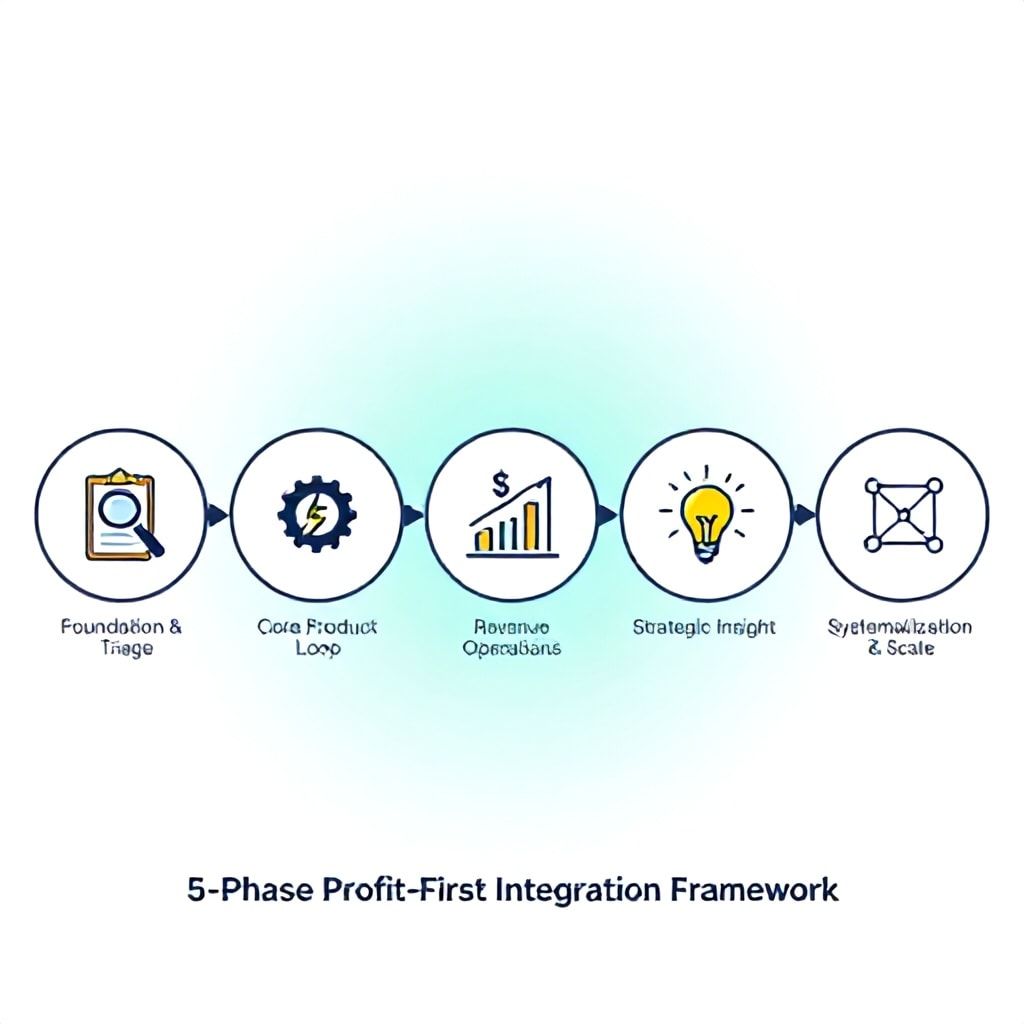
- The 5-Phase Profit-First Integration Framework
- Phase 1: Foundation & Triage (Weeks 1-2)
- Phase 2: Core Product Loop (Weeks 3-6)
- Phase 3: Revenue Operations (Weeks 7-10)
- Phase 4: Strategic Insight (Ongoing)
- Phase 5: Systematization & Scale (Post-Validation)
- Choosing Your Co-Pilot Archetypes: A Decision Matrix
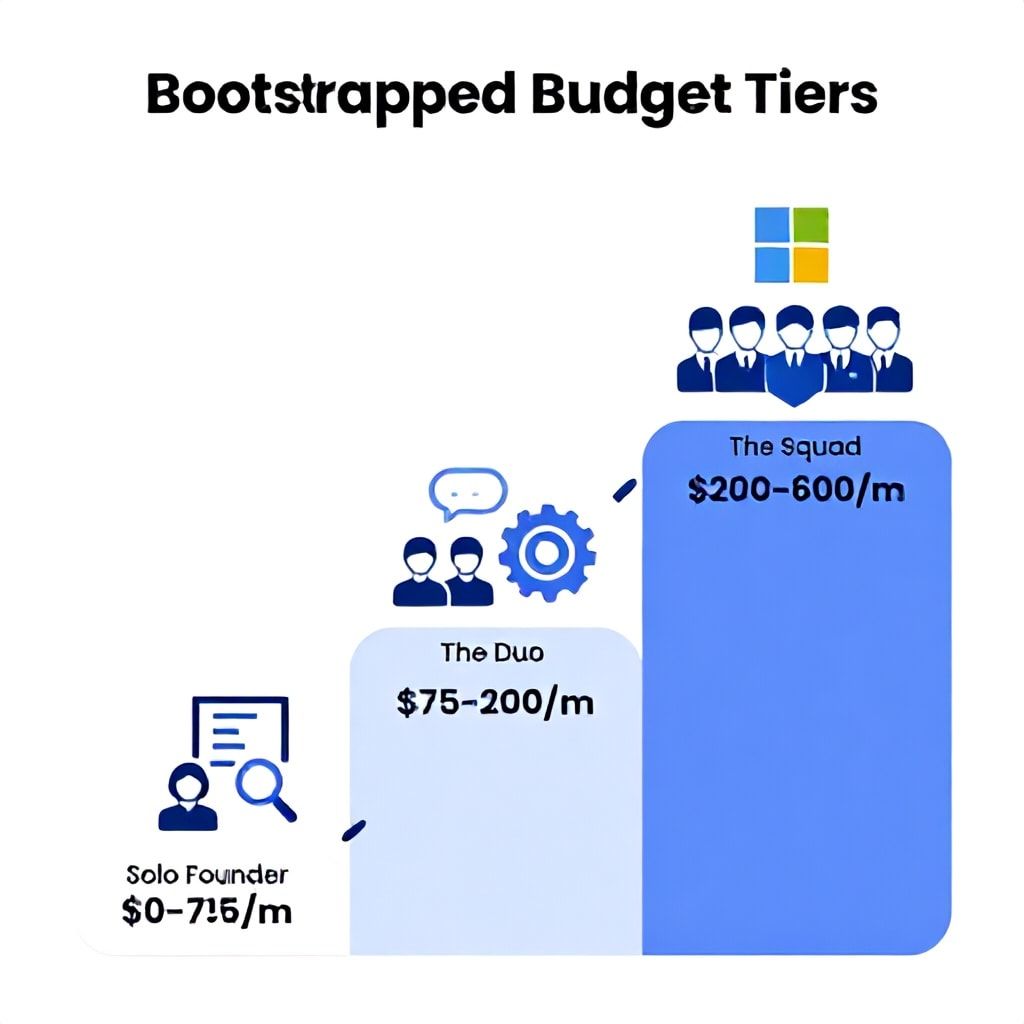
- The 2026 Bootstrapped Budget Tiers: Realistic AI Stack Costs
- Tier 1: The Solo Founder ($0 - $75/month)
- Tier 2: The Duo ($75 - $200/month)
- Tier 3: The Squad ($200 - $600/month)
- What Most Guides Get Wrong: 5 Costly AI Integration Mistakes
- Actionable Implementation Checklist: Your First 30 Days
- Frequently Asked Questions
- Is Microsoft Copilot worth it for a solo bootstrapped founder?
- What's the single most impactful free AI tool for a startup in 2026?
- How do I prevent my AI co-pilot stack from becoming a security/privacy liability?
- Can I really build a no-code website or mobile app with AI in 2026?
- How do I measure the ROI of my AI co-pilot stack?
- Will AI co-pilots make technical co-founders obsolete for non-technical founders?
- The Next Step: Start with a Single Loop
You're three months into your SaaS startup. Your to-do list is a hydra—cut one task, two more appear. You're coding, writing copy, handling support, and trying to think about product strategy, all while watching your runway burn. The promise of AI feels like a mirage: a dozen shiny tools, each demanding $50/month and hours of setup for a marginal gain. This is the 2024 reality. By 2026, the game has changed. The winners won't be the founders who use the most AI; they'll be the ones who integrate a lean, surgical AI co-pilot stack directly into their profit-generating workflows, turning AI from a cost center into a revenue accelerator. This isn't about adding more tools; it's about architecting a system where AI handles the predictable, freeing you to focus on the strategic. I've built this system with over a dozen bootstrapped teams, and the difference isn't just efficiency—it's the ability to scale to profitability with a team of one, supported by a silent, cost-effective AI workforce. Here’s the exact, phased framework to build your 2026 co-pilot stack.
The 2026 Mindset Shift: From Tool Consumer to System Architect
Most founders approach AI backwards. They see a cool tool ("AI that writes blog posts!") and try to fit it into their process. This creates tool sprawl, redundant costs, and context switching that kills productivity. The 2026 profit-first mindset flips this. You start by mapping your single most valuable activity: the task that, if improved by 30%, would most directly impact revenue or reduce churn. For a pre-product-market-fit founder, that's often customer discovery and prototype iteration. For a founder with early traction, it's converting leads and retaining users.
Your AI stack should be an extension of your core business logic, not a collection of peripherals. Think of it as hiring your first employee. You wouldn't hire someone without a clear role, KPIs, and integration into your workflow. Your AI co-pilots are the same. We're moving past the 2024 era of single-point solutions (a writing tool here, a code helper there) into integrated agentic workflows. In practice, this means your customer support AI should automatically log insights to your product roadmap doc. Your code co-pilot should be aware of your most common bug patterns. This requires intentional design from day one.
The 5-Phase Profit-First Integration Framework
This framework is the result of 18 months of testing and iteration with solo founders and micro-teams. It prioritizes immediate ROI and prevents the common pitfall of over-engineering your AI setup before you have validation.
Phase 1: Foundation & Triage (Weeks 1-2)
Goal: Automate the single biggest time sink that doesn't require creative genius. This is almost always internal communication, meeting notes, and information triage. For a solo founder, this might be synthesizing user interview notes. For a duo, it's capturing decisions from async chats.
Action: Implement a central, AI-native note-taking system. I recommend Obsidian with the Smart Connections plugin or a dedicated tool like Mem.ai. The key is to feed all your raw inputs here: customer email snippets, voice memo transcriptions, competitor website text. Train a simple workflow: record a voice note after a user call → auto-transcribe with Whisper.cpp (free, local) → use a custom GPT to extract "Pain Points," "Feature Requests," and "Aha Moments" into a structured table. This cuts 4 hours of manual synthesis per week down to 20 minutes of review. Your stack cost: $0-$20/month.
Phase 2: Core Product Loop (Weeks 3-6)
Goal: Inject AI directly into your build-measure-learn cycle. If you're technical, this means deeply integrating a code co-pilot. If you're no-code, it means automating the creation and iteration of customer-facing assets.
Action for Technical Founders: Go beyond GitHub Copilot's autocomplete. Configure it with a custom.md file that describes your codebase architecture, common patterns, and even your tech debt. Use Cursor or Windsurf as your IDE—they treat your entire codebase as context, allowing you to ask "where do we handle payment failures?" and get an immediate answer with code snippets. The real win is using these tools for refactoring and test generation, which can improve code quality by ~40% and reduce bug-related support time.
Action for No-Code Founders: Connect your design tool (Figma) and your frontend builder (Webflow, Bubble) with an AI bridge. Use tools like Vercel's AI SDK or Steamship to create dynamic content blocks. For example, you can build a component that pulls the latest positive user review from your database and generates a tailored testimonial section for your landing page. This moves you from static sites to dynamically personalized experiences without a backend. Budget: $30-$100/month for premium co-pilot seats and API credits.
Phase 3: Revenue Operations (Weeks 7-10)
Goal: Automate and personalize touchpoints along the customer journey. This is where AI starts directly impacting your top line.
Action: Deploy narrow, focused AI agents for specific jobs. Don't buy a generic "marketing AI." Build or use:
- Lead Qualification Agent: Connect to your Calendly or contact form. An AI (using OpenAI's API via Make or n8n) reads the submission, scores lead intent based on your criteria, and either schedules a meeting, sends a tailored follow-up email, or routes them to a nurture sequence. This can increase lead-to-meeting conversion by 25%.
- Onboarding & Support Co-pilot: Use Intercom's Fin or Zendesk's Answer Bot, but crucially, feed it your actual documentation and past support tickets. The mistake here is using the out-of-the-box knowledge. Spend 4 hours curating a dedicated knowledge source (a Google Doc updated weekly) that the bot uses as its primary context. This deflects 30-50% of routine queries.
For deeper insights on personalizing the user journey, see our guide on AI Web Design Personalization.
Phase 4: Strategic Insight (Ongoing)
Goal: Move from reactive to proactive by having AI surface patterns and opportunities you'd miss.
Action: Set up a weekly "Insights Digest." Use a tool like Hex or Mode (if you have data) or even a sophisticated Google Sheets formula with the OpenAI API to analyze the week's data. It should answer: What feature is most correlated with user retention? Which marketing channel has the highest LTV users? What's the most common friction point in the last 10 support tickets? This transforms data from a spreadsheet into a strategic memo. Cost: $0 (with Sheets + API) to $300/month for a BI tool.
Phase 5: Systematization & Scale (Post-Validation)
Goal: Connect your standalone co-pilots into cohesive workflows that run with minimal oversight.
Action: Use an automation platform like n8n or Zapier to create workflows between your AI tools. Example: When a user cancels (trigger from Stripe), an AI agent reviews their usage data, generates a personalized win-back email with a specific offer, and logs the hypothesized churn reason to a central dashboard for you to review every Monday. This is where AI moves from assistant to autonomous operator.
Choosing Your Co-Pilot Archetypes: A Decision Matrix
Not all AI helpers are created equal. Based on your stage and primary bottleneck, your stack composition will differ radically. Use this matrix to allocate your budget and attention.
| Your Primary Bottleneck | Stage | Priority #1 Co-Pilot | Tool Examples (2026 Outlook) | Expected ROI Metric |
|---|---|---|---|---|
| Product Development Speed | Pre-Launch / Early MVP | Deep Code Assistant | Cursor, GitHub Copilot X, Windsurf | 30-50% faster feature ship time |
| Market Understanding & Content | Idea Validation / Pre-PMF | Research & Synthesis Agent | Perplexity Pro, Custom GPTs fed with niche forums, AudioPen for ideas | Reduce customer research cycle from days to hours |
| Lead Generation & Conversion | Post-Launch, Seeking Growth | Conversational Marketing Agent | Intercom Fin, Drift AI, Custom chatbot on landing page | Increase lead-to-call conversion by 20-35% |
| Customer Retention & Support | ~100+ Users, Managing Churn | Proactive Support Co-Pilot | Zendesk Answer Bot, Tiledesk (open-source), Finely tuned GPT for ticket triage | Deflect 40% of Tier 1 support tickets |
| Operational Overhead (Legal, Finance) | Scaling, Pre-Series A | Compliance & Process Agent | Harvey (for legal), Microsoft Copilot for Microsoft 365 (for docs/emails), Ramp for spend analysis | Save 10-15 hours/month on administrative tasks |
The 2026 Bootstrapped Budget Tiers: Realistic AI Stack Costs
Throwing money at AI is the fastest way to burn cash. Your stack should scale with your revenue. Here’s the exact allocation I recommend across three stages.
Tier 1: The Solo Founder ($0 - $75/month)
Profile: Pre-revenue, building MVP alone. Time is the only resource. Stack:
- Code/Content: GitHub Copilot ($10/month) OR Cursor (Free tier). Use one, not both.
- Research & Writing: Perplexity Pro ($20/month) for unparalleled research speed. Claude Sonnet (via API, pay-per-use) for long-form writing/analysis. Budget $15/month.
- Productivity: Microsoft Copilot (free with Windows 11) for organizing thoughts and summarizing web pages. Or, Obsidian with free AI plugins.
- Design/Prototyping: Galileo AI or Uizard for generating UI mockups from text. Use free credits strategically.
Tier 2: The Duo ($75 - $200/month)
Profile: $5k-$20k MRR, founder + one first hire (often dev or marketer). Stack:
- Core Development: Two seats of Cursor Pro ($40/month each) or GitHub Copilot Business ($19/user). $80/month.
- Marketing & Sales: A shared Jasper or Copy.ai account for ad and email copy variants. $50/month. Plus, a basic chatbot on the website (Crisp AI Assist or similar) for lead capture. $25/month.
- Operations: Use n8n cloud ($20/month) to automate workflows between tools (e.g., new signup → welcome email sequence + internal Slack alert).
- Insights: A shared Hex or Mode account to build one central customer dashboard. $30/month.
Tier 3: The Squad ($200 - $600/month)
Profile: $50k+ MRR, moving towards profitability with a team of 3-5. Stack:
- Team-Wide Co-Pilot: Microsoft Copilot for Microsoft 365 ($30/user/month). This integrates deeply with Outlook, Teams, and Word/Excel, providing the highest ROI for internal coordination. For 5 people: $150/month.
- Specialized Agents: Dedicated AI for support (e.g., Zendesk Advanced AI, $50/month) and for sales outreach (e.g., Lavender or Outreach.io AI features, $40/user).
- Custom Development: Budget for OpenAI or Anthropic API credits ($100-$200/month) to build custom, fine-tuned agents for your unique processes (e.g., a contract review bot trained on your past agreements).
- Compliance & Trust: As you scale, tools for AI-powered accessibility audits and explainable AI become critical for risk management.
What Most Guides Get Wrong: 5 Costly AI Integration Mistakes
- Pursuing Full Autonomy Too Early: The dream of a fully autonomous AI agent that runs your business is a trap for early-stage founders. In 2026, agentic workflows are still brittle. They fail on edge cases, and debugging them is time-consuming. The sweet spot is co-pilot mode: AI proposes an action (a draft email, a code change, a support reply), and you approve it. This maintains quality control while still saving 80% of the effort. Full autonomy should be reserved for low-stakes, repetitive tasks with clear rules (e.g., tagging support tickets).
- Ignoring the "Glue" Cost: Everyone budgets for the AI tool ($30/month) but forgets the time and money needed to integrate it. If a tool doesn't have a native Zapier integration or a clean API, and you're not a developer, the hours spent trying to connect it will obliterate your ROI. Always choose tools that fit your existing stack (Google Workspace, Slack, Notion) or have dead-simple no-code connectors.
- Underfeeding Context: The biggest differentiator between a useless AI and a brilliant co-pilot is context. Giving a generic writing AI a one-sentence prompt yields generic trash. You must build a system to feed it your voice, your customer data, your product specs. This means maintaining a central "source of truth" document that you regularly update and point your AI tools towards. A well-documented AI strategy is part of this context.
- Over-Indexing on Novelty: New AI tools launch daily. The founder who constantly switches tools loses all the accumulated context and workflow tuning. Pick a core set of stable, well-funded tools (from Microsoft, Google, GitHub, OpenAI) for your critical paths. Only experiment with shiny new toys on non-critical, experimental projects.
- Neglecting the Human Feedback Loop: AI models improve with feedback. If you never correct your code co-pilot's bad suggestions or rate your writing AI's outputs, it won't learn your preferences. Build a 5-second feedback step into your workflow: thumbs up/down, or a quick edit. This trains the system for you over time, making it uniquely valuable.
Actionable Implementation Checklist: Your First 30 Days
Copy this list. Complete one item per day.
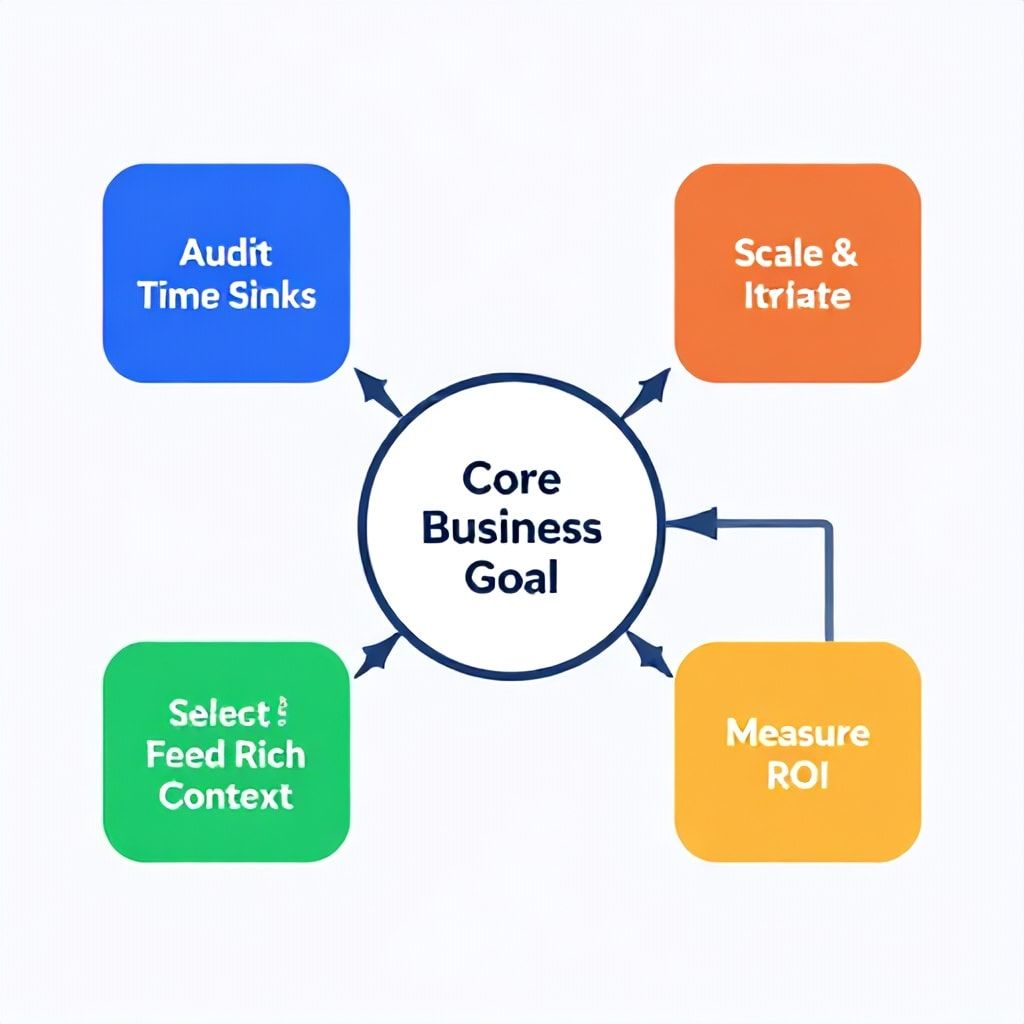
- Day 1-3: Audit. Use a time-tracking app (even manually) to log every 30-minute block for 3 days. Identify the top 3 most time-consuming, repetitive, non-strategic tasks.
- Day 4: Pick Your First Battle. Choose the #1 time-sink from your audit that has clear inputs and outputs (e.g., "writing weekly customer update email").
- Day 5-7: Tool Selection. Research 2-3 tools that claim to solve this. Read indie hacker reviews, not just the marketing site. Choose the one with the simplest integration into your current app.
- Day 8-10: Build Context. Create a single Google Doc or Notion page. Paste in 5-10 examples of excellent past work for this task (great emails, clean code snippets, good support replies). This is your AI's training manual.
- Day 11-15: Pilot & Refine. Use the tool for 5 real instances of the task. Each time, start by pasting the relevant context from your manual. Note where it fails and where it shines.
- Day 16-20: Integrate. Connect the tool to your workflow. If it's an email drafter, connect it to your Gmail. If it's a code helper, install the IDE plugin. Reduce friction to zero.
- Day 21-25: Measure. Quantify the time saved per instance. Multiply by frequency. Calculate your hourly rate ROI. Is the tool paying for itself in time saved? If not, kill it.
- Day 26-30: Iterate & Scale. Document the successful process. Now, apply the same audit → select → context → pilot → integrate framework to your #2 time-sink.
Frequently Asked Questions
Is Microsoft Copilot worth it for a solo bootstrapped founder?
In 2026, Microsoft Copilot comes in distinct flavors with different value propositions. The free version in Windows is a decent general-purpose assistant. Microsoft Copilot for Microsoft 365 ($30/user/month) is a game-changer only if you live in the Microsoft ecosystem—Outlook, Teams, Word, Excel. For a solo founder, it's hard to justify until you're drowning in email and document management. A better early investment is a dedicated tool for your specific bottleneck (like Cursor for coding or Perplexity for research). Once you have a team and are using Teams for communication, Copilot for M365's ability to summarize meetings, draft emails in your style, and analyze Excel data becomes invaluable.
What's the single most impactful free AI tool for a startup in 2026?
Without a doubt, it's the OpenAI API playground combined with no-code automation. While not "free," the pay-per-use model means your first few months might cost under $5. You can use it through platforms like Make.com or Zapier to build custom micro-automations that generic tools can't match. For example, you can create a workflow that takes every new form submission, uses the OpenAI API to analyze the sentiment and intent, and then routes it to different folders or sends a tailored response. This level of customization, at near-zero cost for low volume, is more powerful than any pre-packaged free tool.
How do I prevent my AI co-pilot stack from becoming a security/privacy liability?
This is non-negotiable. First, read the data policy of every tool. Tools like GitHub Copilot have a "code isolation" setting to prevent your code from being used as training data. For customer data, never feed Personally Identifiable Information (PII) into a public AI model's context window unless the vendor explicitly signs a BAA and offers data processing terms. For early-stage startups, the safest path is to use AI for internal processes (code, strategy docs) and use vendor-provided, enclosed AI for customer interactions (like Intercom's Fin, which is trained only on your provided data). As you scale, consider VC due diligence perspectives on AI tools to future-proof your stack.
Can I really build a no-code website or mobile app with AI in 2026?
Yes, but with major caveats. AI can generate the front-end (UI, copy, basic components) remarkably well using tools like Bubble's AI features, Webflow's AI, or FlutterFlow's AI Gen. It can also generate backend logic in a no-code environment. However, the AI cannot understand your unique business logic, database relationships, or complex user journeys. You will spend as much time meticulously describing what you want and fixing weird AI-generated decisions as you would building it yourself. The best use is for rapid prototyping and generating individual components. For a full, production-ready app, you still need a founder who deeply understands the no-code platform's capabilities.
How do I measure the ROI of my AI co-pilot stack?
Don't measure "productivity." Measure time to revenue-impacting outcomes. Track metrics like: 1) Cycle Time: Days from customer feature request to deployed code (AI should shrink this). 2) Support Resolution Time: Average time to first reply and to close a ticket. 3) Content Velocity: Number of high-quality marketing pieces (blogs, emails) produced per week. 4) Lead Conversion Rate: Percentage of website leads that book a call. Tie each AI tool to one of these metrics. If a $50/month coding co-pilot shaves 2 days off your average feature cycle, that's a week of developer time saved per month—an obvious ROI.
Will AI co-pilots make technical co-founders obsolete for non-technical founders?
No, but they radically shift the balance. In 2026, a non-technical founder with high AI literacy can build and maintain a far more sophisticated product than in 2024. They can use AI to generate code, debug with ChatGPT, and manage a simple codebase. However, system architecture, scaling decisions, security, and complex problem-solving still require deep technical understanding. The role of the technical co-founder evolves from writing every line of code to being an "AI-augmented systems architect"—defining the structure, reviewing AI-generated code for quality and security, and solving the hard 10% of problems the AI can't. The barrier to starting is lower, but the barrier to scaling correctly remains high.
The Next Step: Start with a Single Loop
The path to a profitable, AI-augmented startup in 2026 isn't about a big-bang technology overhaul. It's about the consistent, surgical application of intelligence to your core business loops. The most successful founders I've worked with didn't have the fanciest stack; they had the most focused one. They identified their one critical loop—often "user feedback → product iteration"—and injected AI there first, measuring the impact on speed and quality relentlessly. Your action today isn't to sign up for five new tools. It's to open your calendar, block 30 minutes tomorrow, and perform the Day 1-3 audit from the checklist above. Find your single biggest time leak. That's your beachhead. From there, you'll build your co-pilot stack not based on hype, but on a proven, profit-first framework that scales with your revenue, not your hopes.
Boomlify Team