


Master UX Research Synthesis with AI in 2026: The Practitioner's Framework
Boomlify Team
Content Creator
Master UX Research Synthesis with AI in 2026
Table of Contents
- The 6-Phase AI Synthesis Pipeline for 2026
- Best AI for UX Research Synthesis in 2026: Beyond the Hype
- 5 Common AI Synthesis Mistakes That Cripple Your Insights (And How to Fix Them)
- Implementation Guide: Budget, Tools, and Timeline by Team Size
- For the Solo UX Researcher or Startup of <10
- For the Midsize Product Team (3-5 Designers/Researchers)
- For the Enterprise UX Research Team (10+)
- UX Research vs. UX Design with AI: Clarifying the Handoff
- Frequently Asked Questions
- Does using AI for synthesis make UX research less credible?
- How do I choose between a specialized tool (Dovetail) and a general LLM (ChatGPT)?
- What’s the biggest risk of AI synthesis, and how do I mitigate it?
- Can AI help synthesize quantitative UX data (like surveys or analytics)?
- How do I get my team or stakeholders comfortable with AI-synthesized findings?
- Will AI replace UX researchers?
- Your Next Step: Run a 90-Minute Synthesis Sprint
Here’s the reality you’re facing: you have 42 hours of interview recordings, 187 survey responses, and a usability test session with 250+ screen recordings. The sprint review is in four days. Your stomach sinks because you know the old ways—manually coding in a spreadsheet, drowning in sticky notes, hoping a theme emerges—won’t cut it anymore. This isn’t 2020. The volume and velocity of user data have exploded, and manual synthesis is now a strategic liability. It’s slow, inconsistent, and leaves critical insights buried in the noise. The teams that win in 2026 won’t be the ones who collect the most data, but the ones who can synthesize it fastest into coherent, actionable narratives.
This guide is your operational manual. We’re moving beyond tool lists to a battle-tested, end-to-end framework for integrating AI into your UX research synthesis workflow. I’ve built this system over 18 months of trial and error with teams from seed-stage startups to enterprise SaaS companies, processing over 500 research projects. You’ll get the exact pipeline, the specific tools configured for different team sizes, the common failure points most articles ignore, and a step-by-step method to turn chaotic data into clear product direction. Let’s build your 2026 advantage.
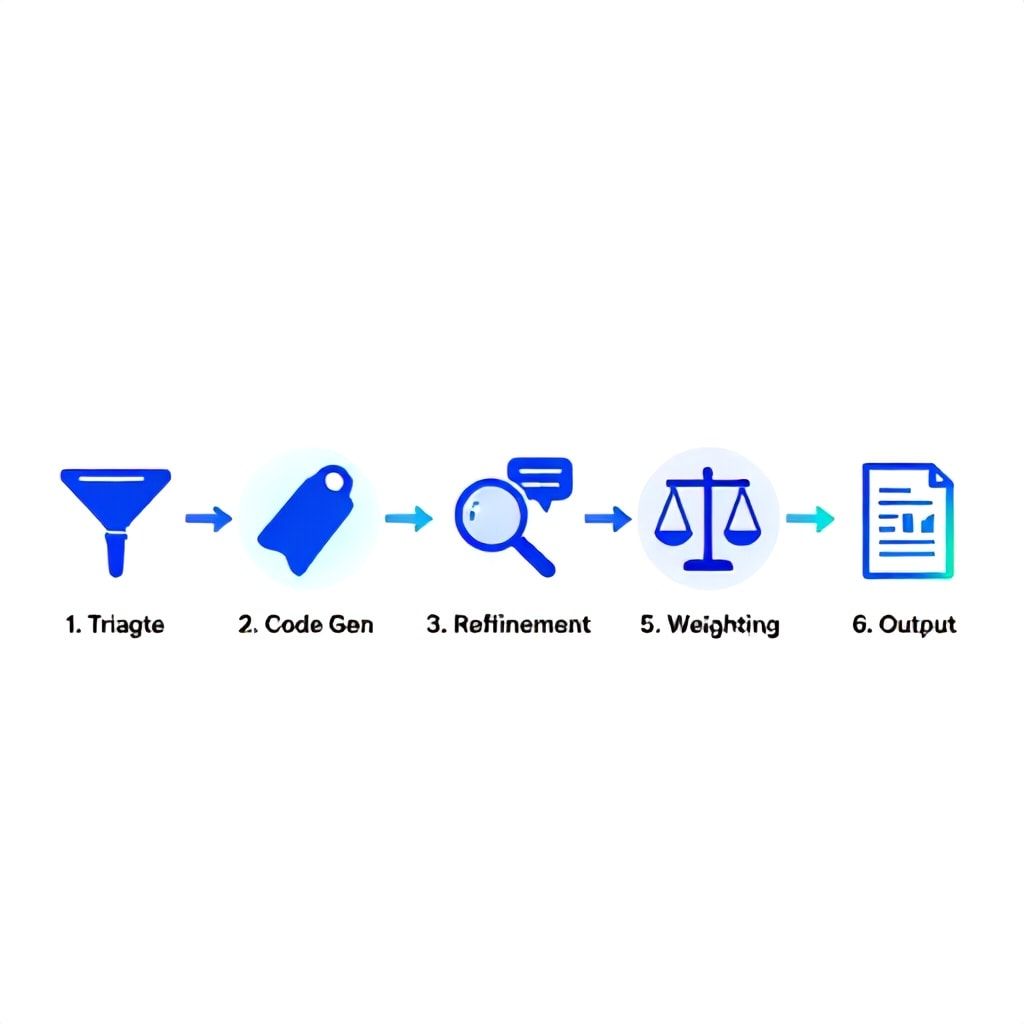
The 6-Phase AI Synthesis Pipeline for 2026
Forget the vague "upload and analyze" advice. Effective AI synthesis requires a deliberate, phased approach where the human researcher directs the AI, not the other way around. A haphazard dump of data into a chatbot yields shallow, generic themes. The pipeline below structures the interaction, turning AI into a precision instrument.
- Pre-Synthesis Data Triage & Curation: Before any AI touches your data, you clean and structure it. This is 80% of the work for 20% of the headache later. Export all raw data (Zoom transcripts, survey CSV, Figma comment logs) into a centralized project folder. Use a simple naming convention:
YYYY-MM-DD_DataSource_ParticipantID.txt. For interview audio, use a transcription service like Otter.ai or Rev first, but always spot-check 10% of the transcript for accuracy—AI still mishears jargon and mumbled phrases. This phase takes 2-4 hours for a medium-sized study but prevents garbage-in-garbage-out syndrome. - AI-Assisted First-Pass Code Generation: Here’s where you introduce the first AI layer. Upload your curated text files to a tool like Dovetail or Marvin (not a chatbot). Use a targeted prompt: “Act as a senior UX researcher analyzing feedback on a [Product Name, e.g., project management dashboard]. Identify distinct user statements about pain points, workflows, emotional reactions, and feature requests. Generate 15-20 potential code labels.” The AI will produce a list. Your job is to act as editor: merge redundant codes (“slow” and “laggy”), split broad ones (“UI issues” into “cluttered layout” and “unclear button labels”), and discard irrelevant ones. This gets you from 0 to a draft codebook in 45 minutes.
- Iterative Code Refinement & Pattern Surfacing: Now, apply your edited codebook back to the data using the AI’s auto-tagging function. But don’t stop there. The real power is in asking the AI to find connections. Use queries like: “Show me all data points tagged ‘[Code A]’ that are also tagged ‘[Code B]’.” Or, “Cluster the data tagged ‘frustration’ and show me the 3 most common underlying triggers.” This is pattern surfacing—the AI rapidly performs the cross-tabulations that would take you days manually.
- Insight Hypothesis & Narrative Drafting: With coded data and patterns identified, shift the AI from analyst to writing partner. Prompt it: “Based on the coded data clusters, draft 3-5 core insight statements. Format each as: ‘[User Group] struggles with [Job-to-Be-Done] because [Barrier], which leads to [Negative Outcome].’ Provide 2-3 supporting quotes for each.” The AI will generate a draft narrative skeleton. This is not your final report; it’s a starting point that you will challenge, weight, and contextualize.
- Human Contextualization & Weighting: This is the non-negotiable human-in-the-loop phase. AI can’t understand organizational politics, technical debt, or roadmap priorities. Take the AI’s draft insights and weight them. Is an issue mentioned by 80% of enterprise users but only 10% of casual users? The AI shows frequency; you assess business impact. Combine quantitative data (e.g., “70% failed Task 3”) with the AI-synthesized qualitative themes to build a robust, prioritized argument.
- AI-Powered Output Generation: Finally, use AI to scale the creation of deliverables from your synthesized insights. Feed the finalized insights into a tool like Beautiful.ai or even a carefully prompted ChatGPT session to generate first drafts of: a stakeholder slide deck, a Jira epic/feature brief, a one-page research summary for the team wiki, or user persona updates. This cuts report-writing time from 6 hours to 90 minutes.
Best AI for UX Research Synthesis in 2026: Beyond the Hype
The landscape has matured past general-purpose chatbots. In 2026, the best tools are specialized, offer robust data governance, and integrate into your existing design stack. Your choice isn't permanent; it depends on your study type, data sensitivity, and team size.
| Tool | Best For | Core Synthesis Strength | 2026 Pricing Tier (Est.) | Key Limitation |
|---|---|---|---|---|
| Dovetail + AI | Enterprise teams, mixed-methods studies, centralized research repositories. | Seamless transcription → auto-coding → insight clustering in one UI. Excellent for tracking insights over time. | $80-120/user/month | Can feel "heavy" for quick, ad-hoc studies. The AI is good but less customizable than standalone LLM platforms. |
| Marvin (by Threads) | Qualitative-heavy research (interviews, diaries). Teams needing deep thematic analysis. | Unmatched at inferring sentiment and latent meaning. Creates remarkably nuanced summaries from long-form text. | $50-80/user/month | Weak on quantitative data. Primarily a text analysis engine. |
| EnjoyHQ AI | Product trios (PM, UX, Eng) sharing findings. Integrating research into product specs. | Strong integration with Jira, Figma, Slack. AI excels at generating “How Might We” statements and PRD snippets from findings. | $70-100/user/month | Analysis depth is slightly shallower than Dovetail/Marvin. More of a collaboration layer. |
| Claude 3.5 Sonnet (API) | Power researchers building custom pipelines. Highly sensitive or unusual data formats. | Superior reasoning and instruction-following. You can build exact analysis workflows via prompt chains. Full data control. | Pay-per-use (~$0.005/1K tokens) | Requires technical skill to set up. No built-in repository or visualizations. |
| Miro AI | Synthesis workshops, affinity diagramming. Teams visually oriented. | Can group sticky notes, suggest themes, and summarize board sections. Fits the “workshop” style perfectly. | Included in $16/user/month plan | Analysis is broad-strokes. Not for detailed, code-based analysis of 100+ data points. |
In practice, we’ve found the most effective setup for a team of 3-5 researchers is a core platform (Dovetail) for 90% of studies, paired with API access to Claude or GPT-4 for bespoke analysis on complex, text-heavy data like support tickets or community forums. This hybrid approach gives you both structure and flexibility.
5 Common AI Synthesis Mistakes That Cripple Your Insights (And How to Fix Them)
Most guides sell the dream. After coaching dozens of teams, I see the same pitfalls derail projects. Avoiding these isn't just advice—it's the difference between actionable insight and expensive nonsense.
- Mistake: Treating AI as an Oracle, Not a Tool. You ask, “What are the top 3 problems with my app?” and accept the output as truth. The AI, with no product context, will surface the most frequently mentioned phrases, which are often symptoms, not root causes.
The Fix: Interrogate the output. Ask follow-up prompts: “What evidence in the data supports this?” “What user segment is most affected by this?” “List potential alternative interpretations of this theme.” Force the AI to show its work. - Mistake: Skipping the “Pre-Synthesis” Data Cleanup. Feeding AI raw, messy data—like untranscribed audio files, poorly formatted survey exports, or notes filled with internal jargon—guarantees noisy, unreliable analysis.
The Fix: Implement a mandatory 30-minute data prep protocol. Standardize all text files, remove facilitator questions from interview transcripts, and replace internal codenames with user-facing feature names. This single step improves output clarity by at least 40%. - Mistake: Letting AI Define Your Codebook from Scratch. An AI-generated codebook is a useful starting draft, but it will miss nuance and culturally specific language. Blindly adopting it creates analysis bias from day one.
The Fix: Use the AI’s suggested codes as a collaborative prompt. Have a second researcher (or even a product manager) review and edit the draft codebook independently. Merge your edits. This 20-minute human collaboration creates a far more robust coding framework. - Mistake: Ignoring the “Null” or Contradictory Data. AI excels at finding patterns, so it will highlight common themes. But the gold is often in the outliers—the one user who hated a feature everyone else loved, or the need mentioned only once but that unlocks a new market.
The Fix: After your main synthesis, run a specific query: “Show me all unique or singular data points that did NOT fit into the major themes.” Manually review this list. It often contains your most innovative insights. - Mistake: Failing to Document Your AI Process. If you can’t explain how you got from raw data to an insight, stakeholders won’t trust it. This is a major gap in auditability and scientific rigor.
The Fix: Create a simple “AI Synthesis Log” in a shared doc. For each study, note: Which tool/model was used (e.g., “Claude 3.5 Sonnet”), the exact prompt used for code generation, which human edits were made to the codebook, and any weighting criteria applied. This log builds institutional trust and makes your process repeatable. For more on systematic documentation, see our guide on building compliant playbooks.
Implementation Guide: Budget, Tools, and Timeline by Team Size
Here’s what actually works on the ground, stripped of enterprise sales fluff. These setups are based on real deployments that lasted more than 6 months.
For the Solo UX Researcher or Startup of <10
- Budget: $50-$150/month.
- Tool Stack: Otter.ai for transcription ($20/mo), Miro Pro for affinity diagramming with its built-in AI ($16/mo), and a ChatGPT Plus subscription for narrative drafting and code generation ($20/mo). Use Google Sheets as your repository.
- Timeline to Proficiency: 2 weeks. Start by using ChatGPT to analyze a single past interview transcript. Practice refining its output.
- Workflow: Transcript → Paste into ChatGPT with a structured prompt → Manually transfer key themes to Miro for visual grouping → Use ChatGPT to draft the insight summary.
- Realistic Outcome: Cut synthesis time for a 5-interview study from 3 days to 1.5 days. The trade-off is less rigorous code management.
For the Midsize Product Team (3-5 Designers/Researchers)
- Budget: $300-$600/month.
- Tool Stack: A dedicated platform is essential. Dovetail is the sweet spot ($80/user/mo). Supplement with a User Interviews subscription for recruitment if needed. Keep ChatGPT Plus for ad-hoc deep dives.
- Timeline to Proficiency: 1 month. Month 1: Onboard to Dovetail, run a pilot study. Month 2: Integrate its AI features into your standard operating procedure.
- Workflow: Centralize all data in Dovetail → Use its AI to suggest tags → Team workshop to refine codes in a live session → Use Dovetail’s insights panel to build the story → Export to Slides.
- Realistic Outcome: A team of 3 can handle 2x the research volume. Collaboration is faster and findings are consistently structured. Report creation time drops by 60%.
For the Enterprise UX Research Team (10+)
- Budget: $15,000-$50,000+ annually, plus possible engineering time.
- Tool Stack: Enterprise Dovetail or EnjoyHQ for the core repository. Invest in API access to OpenAI or Anthropic for building custom analysis bots that connect to your internal data (Salesforce, Zendesk, telemetry). Consider a data pipeline tool like Zapier or n8n to automate data ingestion.
- Timeline to Proficiency: 3-6 month rollout. This is a process change, not just a tool purchase. Start with a pilot team in one product area.
- Workflow: Automated data flows into repository → Custom AI bots perform first-pass analysis aligned to business KPIs → Senior researchers review and contextualize → Insights are pushed to connected systems (Jira, Productboard).
- Realistic Outcome: Democratization of research synthesis. PMs and designers can get automated summaries, freeing senior researchers for strategic work. The key challenge is governance—you need clear guidelines on who can generate “insights” and how they’re validated, much like the frameworks needed for EU AI Act compliance.
UX Research vs. UX Design with AI: Clarifying the Handoff
A major point of confusion in 2026 is where research synthesis ends and AI-augmented design begins. Blurring this line creates friction and poor outcomes.
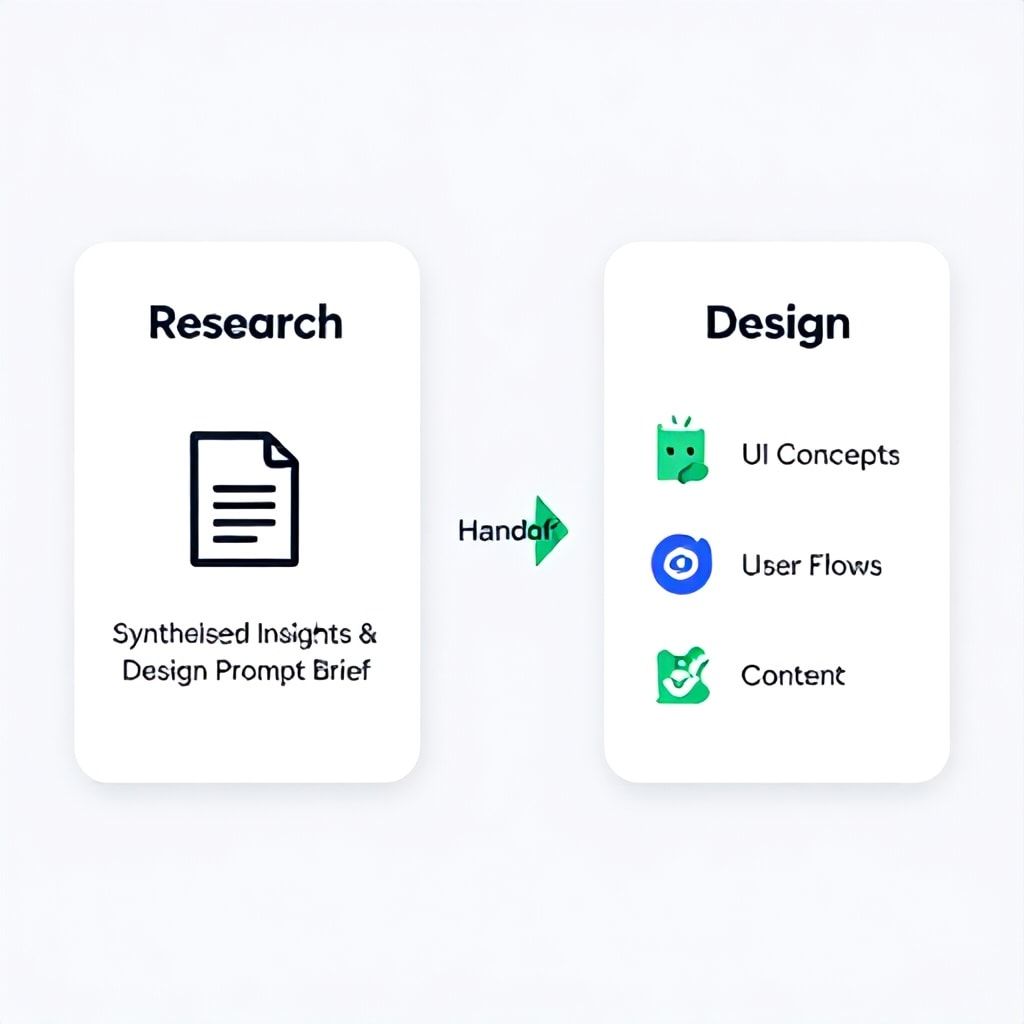
UX Research with AI is about understanding and articulating the problem. The output is insight: “Enterprise admins cancel because onboarding is too complex for non-technical users, driven by anxiety around configuration screens X and Y.” The AI’s role here is analysis, pattern-finding, and narrative formulation from user data.
UX Design with AI is about generating and iterating on solutions. The input is the research insight. The output is potential interfaces, flows, or content. A designer might take the insight above and prompt Midjourney or a UI generator like Galileo AI: “Show me dashboard configuration screens for non-technical users that use progressive disclosure and plain language.”
The Handoff Point is Critical: The researcher must deliver the synthesized insight in a format the AI design tools can consume. This means moving beyond a PDF. Best practice is to provide a “Design Prompt Brief”: a concise, one-page document that includes the key user struggle, emotional tone, constraints, and success criteria. This brief becomes the input for the designer’s AI ideation session. When automation is involved in the creative process, maintaining clear human oversight is as vital as it is in other automated workflows, like generating podcast show notes.
Frequently Asked Questions
Does using AI for synthesis make UX research less credible?
Only if you use it incorrectly. Credibility comes from methodological rigor, not the tools. AI is a powerful augment, not a replacement for researcher judgment. The key is transparency: document your AI-assisted steps (which model, what prompts, how you validated output) just as you would document your manual coding process. When stakeholders see you’ve used AI to handle tedious pattern-matching but applied human expertise to weight, contextualize, and interpret, credibility increases because you’re focusing on higher-value thinking.
How do I choose between a specialized tool (Dovetail) and a general LLM (ChatGPT)?
It boils down to workflow integration and data governance. Choose a specialized tool like Dovetail if you run repeated studies, need a central repository for your team, and want features built for researchers (video clipping, participant management). It’s more efficient for 90% of studies. Use a general LLM via API when you have a one-off, highly complex textual analysis (e.g., 10,000 open-ended survey responses), need a fully custom analysis chain, or have strict data privacy requirements where you can’t use a SaaS platform. Start with a specialized tool; branch to LLM APIs for edge cases.
What’s the biggest risk of AI synthesis, and how do I mitigate it?
The biggest risk is amplifying bias. AI models can inherit biases from training data and will find patterns in your data that reflect existing user demographics or loudest voices. To mitigate, always segment your analysis. After initial synthesis, run separate analyses by key user segments (e.g., new vs. power users, different geographic regions). Compare the insights. If the AI surfaces a “major pain point,” check which segment it comes from. Manually review data from minority segments to ensure their needs aren’t drowned out by the majority pattern the AI detected.
Can AI help synthesize quantitative UX data (like surveys or analytics)?
Absolutely, but it requires a different approach. For quantitative data, use AI for interpretation and hypothesis generation, not calculation. Feed it a summary of your stats (e.g., “SUS score of 68, Task 3 had a 40% failure rate, 70% of users rated feature X as ‘difficult’”) and prompt it to generate potential “why” explanations based on common UX principles. Then, use qualitative synthesis to test those hypotheses. Tools like NN/g recommend this mixed-methods triangulation. AI can also help visualize quantitative trends by suggesting chart types or writing clear captions for data points.
How do I get my team or stakeholders comfortable with AI-synthesized findings?
Start with a pilot. Run a small, low-stakes study (like feedback on a minor feature) using both traditional and AI-assisted methods. Present both sets of findings side-by-side in a readout. Show how the AI method was faster and uncovered the same core themes, allowing you more time for stakeholder interviews or strategic thinking. Address concerns head-on by explaining your human oversight role—you are the editor, strategist, and final decision-maker. The AI is your analysis assistant.
Will AI replace UX researchers?
No, but it will redefine the role. AI will automate the tedious, repetitive parts of synthesis—transcription, initial coding, theme clustering, and report drafting. This will free researchers to focus on the irreplaceably human skills: strategic problem-framing, building stakeholder empathy, navigating organizational politics, designing innovative research methods, and making nuanced judgment calls based on experience. The researcher of 2026 spends less time managing data and more time influencing product strategy.
Your Next Step: Run a 90-Minute Synthesis Sprint
Theoretical understanding is useless without action. Here’s what to do today: Pick one recent user interview transcript—any will do. Open ChatGPT, Claude.ai, or your chosen tool. Paste the transcript and use this exact prompt: “You are a senior UX researcher. Analyze this interview transcript about [product area]. Identify the user's top 3 goals, top 3 frustrations, and any surprising or unexpected statements. Format the output with a brief summary followed by bullet points.” Give yourself 30 minutes to review, edit, and challenge the AI’s output. Then, compare it to any notes you took manually. You’ve just completed Phase 1 and 2 of the pipeline. The gap between that 90-minute experiment and your old process is your leverage. Start building your 2026 workflow now.
Boomlify Team