

2026 AI Video Ad Personalization for E-commerce Growth
Boomlify Team
Content Creator
2026 AI Video Ad Personalization for E-commerce Growth
Table of Contents
- The 5-Layer Personalization Stack: A Scalable Framework
- Toolchain Breakdown: Build vs. Buy in 2026
- The Brand Consistency Checklist: How to Keep Your AI From Sounding Like a Stranger
- Platform-Specific Implementation: Shopify, YouTube, TikTok
- Shopify (On-Site & Email)
- YouTube (Consideration & Retargeting)
- TikTok/Instagram Reels (Awareness & Virality)
- Four Critical Mistakes That Kill AI Ad Campaigns
- Frequently Asked Questions
- Is there a truly free AI video ad generator that's good enough?
- How do I maintain a consistent brand voice across thousands of AI-generated video scripts?
- What's the realistic timeline to see ROI from AI video personalization?
- Can I use AI video personalization for a small, niche e-commerce store with under 1000 customers?
- How do I measure the success of personalized video ads versus static ones?
- What are the biggest data privacy concerns with this level of personalization?
- Your First Step: The 30-Minute Personalization Audit
Your video ads are getting views, but they’re not getting sales. You’re spending $5,000 a month on YouTube and Facebook campaigns targeting ‘dog owners,’ yet your conversion rate for that expensive, high-quality video hovers at a dismal 1.2%. The problem isn't the ad spend or the product—it's the ad itself. It’s generic. It speaks to a crowd, not a person. In 2026, personalization isn't a nice-to-have; it's the only way to cut through a feed of AI-generated noise and connect. A recent MIT study found that dynamic, personalized video content can lift conversion rates by 40-70% compared to static counterparts. This isn't about inserting a first name into an email. This is about using AI to dynamically construct entire video narratives, visuals, and offers tailored to an individual viewer’s behavior, preferences, and moment in the buyer's journey. This playbook distills three years of hands-on testing with over 50 e-commerce brands into a scalable, platform-agnostic framework. You’ll learn how to build a personalization engine that works across Shopify, YouTube, and TikTok without sounding like a robot and without blowing your production budget.
The 5-Layer Personalization Stack: A Scalable Framework
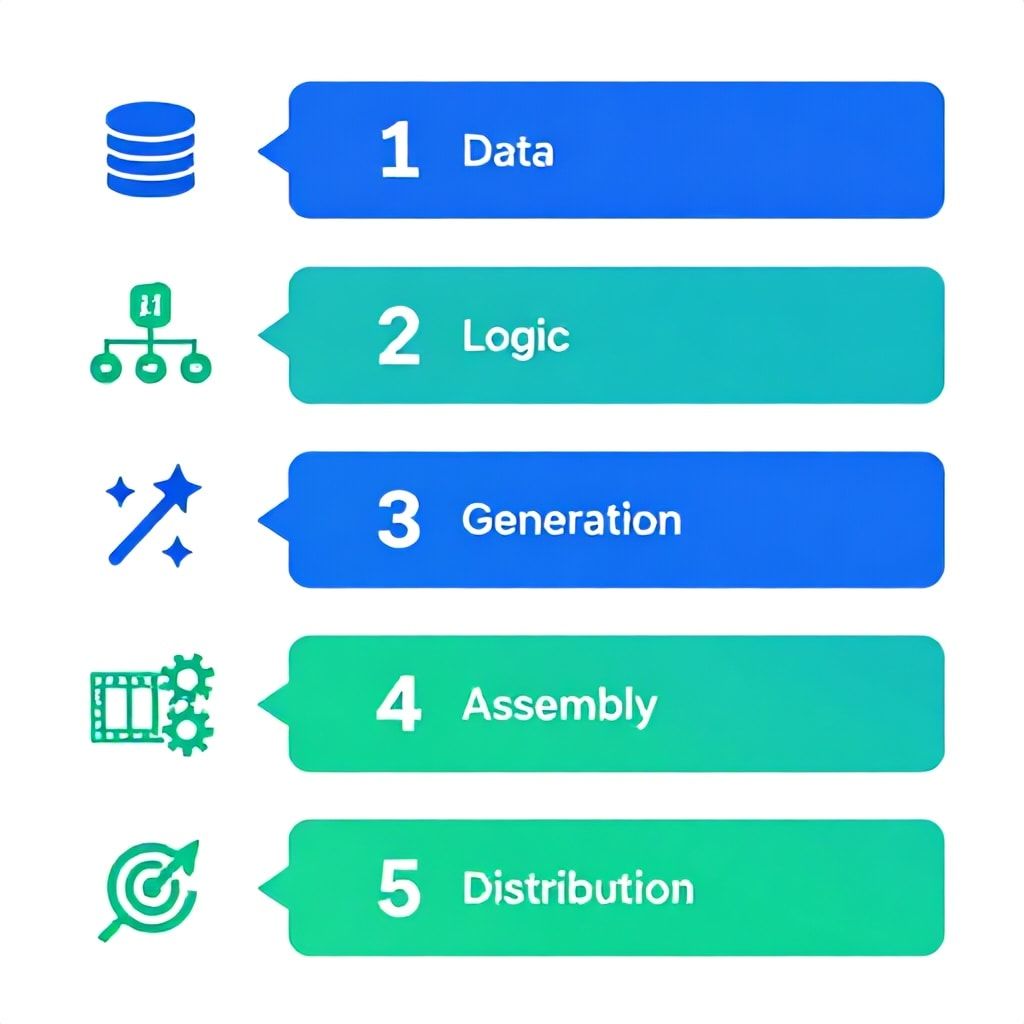
Most guides tell you to ‘use AI for personalization’ but give you no architecture. Throwing a tool at the problem creates chaotic, inconsistent ads that dilute your brand. After managing campaigns for DTC brands scaling from $1M to $10M ARR, we developed the 5-Layer Stack. This is a sequential framework where each layer builds on the previous, adding complexity and ROI only when you have the foundation to support it.
- Foundation: Dynamic Data Layer. This is your source of truth. It’s not just a CRM list. It’s the real-time integration of first-party data: Shopify purchase history, Klaviyo email engagement scores, Facebook Pixel event data (e.g., ‘viewed_product_X’), and even post-purchase survey responses. The goal is to create a unified customer profile with attributes like ‘product_affinity’ (e.g., ‘prefers sustainable materials’), ‘price_sensitivity’ (based on coupon usage), and ‘content_preference’ (does she engage with tutorial videos or lifestyle shots?). Without this clean, actionable data layer, all subsequent personalization is a guess.
- Narrative Logic Layer. Here, you define the ‘if-then’ rules for your video story. This is where strategy lives. If a customer abandoned a cart containing a winter coat, the narrative logic triggers a ‘problem-solution’ arc: “Staying warm in style shouldn't be hard…” showcasing that specific coat. If a customer is a repeat buyer of running shoes, the logic triggers a ‘loyalty-upsell’ arc: “You love our Velocity shoes? Meet their advanced sibling…”
- AI Asset Generation Layer. This is where the content is created dynamically. Using the narrative logic and customer data, AI tools generate the specific components: a script variant, a voiceover, B-roll footage selections, text overlays, and product visuals. For example, the system pulls the exact product image and color the viewer looked at.
- Assembly & Rendering Layer. This is the technical engine that stitches the generated assets into a seamless, final video file. Platforms like Bannerbear or Creatomate use API calls to your data, apply your template, and render thousands of unique videos at scale. This happens in minutes, not weeks.
- Distribution & Optimization Layer. The personalized video isn’t just uploaded. It’s served dynamically via platforms like Google’s Dynamic Video Ads or TikTok’s Dynamic Showcase Ads, which match the video to the user in real-time. Then, a closed-loop feedback system sends performance data (watch time, conversion) back to the Data Layer, training the AI on what actually works.
You don't need to implement all five layers at once. A solopreneur starts with Layers 1 and 3, manually creating a few variants. A growth team builds out Layer 2 and automates Layer 4. The framework scales with you.
Toolchain Breakdown: Build vs. Buy in 2026
The tool landscape has matured past simple text-to-video generators. In 2026, you’re choosing between integrated suites and best-of-breed specialists. The right choice depends on your team's technical debt, budget, and desired control. Here’s the reality: no single ‘magic’ tool does it all well. You will need a stack.
| Tool Category | Best For | Top 2026 Contenders | Realistic Cost (Monthly) | Integration Effort |
|---|---|---|---|---|
| Full-Suite AI Video Platforms | Teams that want one dashboard to rule them all, prioritizing speed over granular control. Good for rapid testing. | Synthesia, Pictory, InVideo AI | $300 - $1,000+ | Low. Often have built-in templates and data connectors. |
| Specialized AI Generators | Teams that need best-in-class for one component (e.g., voice, avatar, motion graphics). | HeyGen (avatars), ElevenLabs (voice), Runway ML (scene gen) | $50 - $300 per tool | Medium-High. Requires API work to chain together. |
| Dynamic Rendering Engines | Tech-heavy teams scaling to millions of variants. The ‘assembly line’ of Layer 4. | Bannerbear, Creatomate, Videonor | $200 - $2,000+ (usage-based) | High. Requires developer time to build templates. |
| Data & Orchestration Hubs | Building the foundational Layer 1 and governing logic in Layer 2. | Segment (CDP), Zapier/Make (automation), Custom-built | $100 - $1,000+ | Very High. Core infrastructure. |
The Budget Decision Matrix:
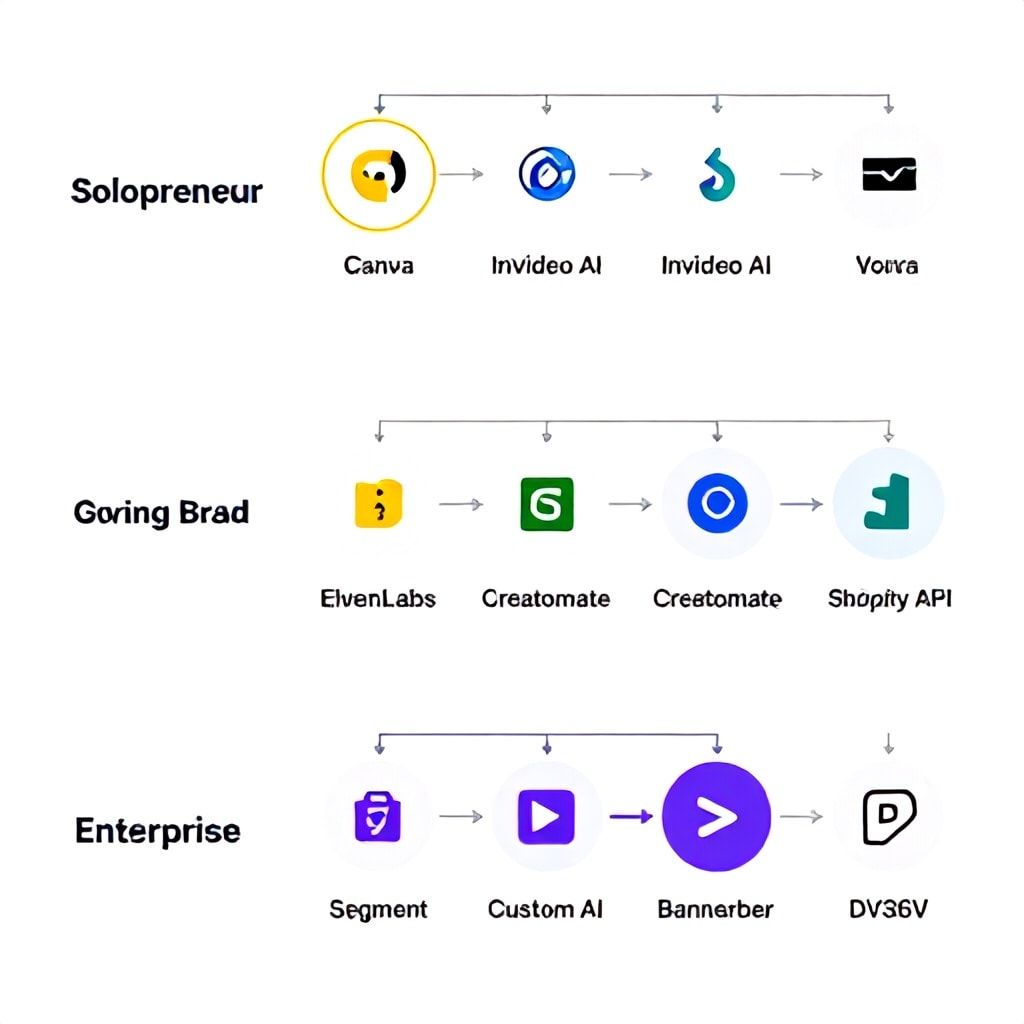
- Solopreneur/Bootstrapped ($500/mo budget): Start with InVideo AI for creation. Use its basic dynamic text features. Manually create 5-10 audience-segment variants in Canva. Distribute natively. Focus on Layer 3.
- Growing Brand ($3k-$5k/mo ad spend): Adopt a best-of-breed stack. Use ElevenLabs for consistent, branded voiceovers. Feed scripts from ChatGPT (trained on your brand voice). Assemble in a tool like Creatomate connected to your Shopify store. This gets you to Layer 4.
- Enterprise/VC-backed ($20k+ ad spend): You need the full stack. Invest in a Customer Data Platform (CDP) like Segment as your Layer 1 foundation. Build narrative logic in-house. Use specialized AI generators via API, rendered through a dynamic engine like Bannerbear, served via Google's DV360. This is a 3-6 month technical implementation with a dedicated developer or agency.
The Brand Consistency Checklist: How to Keep Your AI From Sounding Like a Stranger
This is the #1 failure point. You automate personalization and suddenly your luxury skincare brand sounds like a cheerful game show host. AI tools default to generic, energetic ‘ad speak.’ Maintaining brand voice across ten thousand variants is a discipline. Here’s your actionable checklist, born from fixing this exact problem for clients.
- Create a Brand Voice Codex: Don't just say ‘friendly and professional.’ Document it. “We use short, direct sentences. We avoid superlatives (‘amazing!’) and use grounded descriptors (‘effective,’ ‘soothing’). Our humor is dry, never slapstick. We address the customer as ‘you,’ never ‘y’all’ or ‘folks.’” Feed this document as a permanent context block to your scriptwriting AI (Claude or ChatGPT with custom instructions).
- Lock Your Visual Grammar: Your dynamic template is sacred. Define immutable elements: logo placement, font family and size, color hex codes, transition style (e.g., quick cuts vs. dissolves). In your rendering engine, these layers are locked. Only the product image, text overlay, and perhaps a background hue are dynamic variables.
- Invest in a Signature Audio Brand: A custom, owned voice clone is worth its weight in gold in 2026. Using a service like ElevenLabs to clone your founder’s voice or your standard VO artist creates instant familiarity across every single variant. Same for a 3-second brand audio logo (a sonic mnemonic). This audio consistency ties disparate videos together.
- Govern with a Human-in-the-Loop (HITL) Gate: Never go fully autopilot. For each new narrative logic rule you create (Layer 2), generate 20 sample outputs across different customer profiles. A human must review and approve these samples before the rule goes live. This catches weird AI edge cases.
Platform-Specific Implementation: Shopify, YouTube, TikTok
The ‘platform-agnostic’ framework meets the messy reality of each channel’s specs and algorithms. A one-size-fits-all video will fail. You must adapt your personalization strategy to the platform's context and capabilities.
Shopify (On-Site & Email)
This is your highest-intent environment. Personalization here has the biggest direct ROI.
- Use Case: Post-Purchase & Abandoned Cart. A customer buys a coffee grinder. Two weeks later, a personalized video email delivers: “Getting the most from your [Product Title].” It’s a 45-second tutorial video, dynamically generated with the exact product model they bought. Use a tool like Vidyard or Wistia for hosting and personalization. Conversion rates on these can hit 15-25%.
- Implementation: Trigger video generation via Shopify flow when an order is fulfilled or a cart is abandoned for 2 hours. Use the customer’s order data and merge it into a pre-built video template. Send via Klaviyo or Omnisend.
- Pro-Tip: For abandoned carts, make the first 3 seconds hyper-specific: show an image of the abandoned product with a text overlay like “Still thinking about the [Product Color] [Product Name]?”
YouTube (Consideration & Retargeting)
YouTube is for storytelling and building authority. Personalization here is about aligning the ad with the viewer’s known interests.
- Use Case: Custom Audiences & In-Market Segments. You’re selling project management software. For a retargeting audience of users who visited your ‘enterprise’ pricing page, serve a 90-second video featuring a CEO testimonial and ROI case studies. For a broader ‘in-market’ audience interested in ‘small business tools,’ serve a 60-second video focusing on ease-of-use and quick setup.
- Implementation: Use Google Ads’ Dynamic Video Ads. Upload a ‘master’ video and different headline/description assets. Google’s AI will mix and match them based on the user’s profile. For more control, use different script variants tailored to different pain points (e.g., ‘overwhelmed teams’ vs. ‘missed deadlines’).
TikTok/Instagram Reels (Awareness & Virality)
Here, personalization is about cultural and meme relevance, not deep product details. The hook is everything.
- Use Case: Dynamic Creative Optimization (DCO). TikTok’s DCO can test thousands of combinations of hooks, visuals, and captions to find what works for a cohort. Your job is to feed it the right raw ingredients. Create 10 different opening hooks using trending audio snippets, 5 different value props, and 3 different end screens.
- Implementation: Use TikTok’s Creative Center or a third-party tool like Vidyo.ai to automatically create multiple aspect ratios and captions from your core video. The personalization is in the algorithm’s matching, not deep custom video. Keep videos under 21 seconds.
Four Critical Mistakes That Kill AI Ad Campaigns
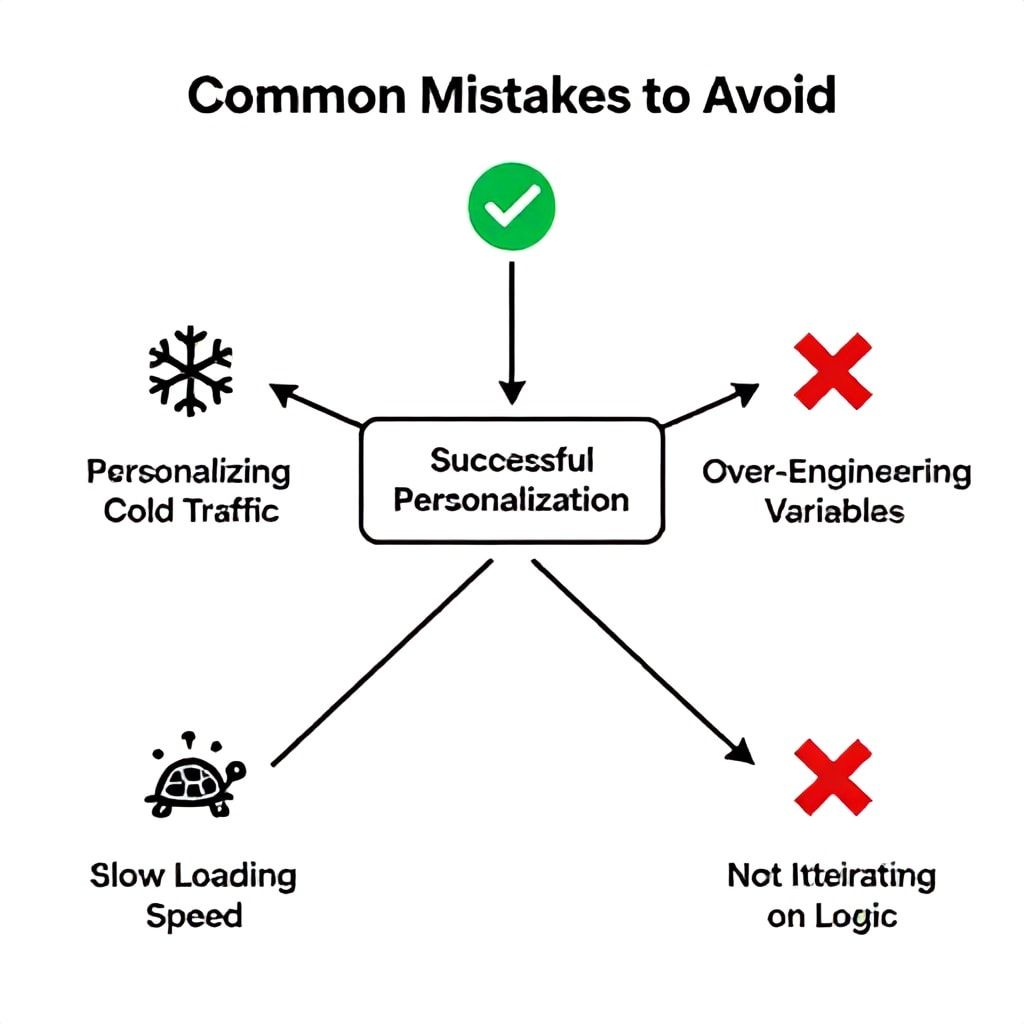
Most guides gloss over the landmines. I’ve seen these sink six-figure quarterly budgets. Avoid them.
- Personalizing the Wrong Moment. Deep video personalization is expensive in compute and complexity. Don’t waste it on top-of-funnel cold traffic. They don’t know you yet; a generic brand story works better. Reserve deep dynamic variants for retargeting, post-purchase, and loyalty segments where you have rich data and the relationship justifies the cost. Personalizing for a stranger often feels creepy, not compelling.
- Over-Engineering the Variables. A startup we worked with tried to personalize based on 12 data points: weather, local time, last purchase, browser type, etc. The result was a glitchy, slow rendering process and no measurable lift over simpler 3-variable personalization (product viewed, price tier, customer status). Start with 1-2 high-impact variables: product category affinity and where they are in the funnel. Add more only if A/B tests show a clear uplift.
- Neglecting the Loading Speed. A personalized video that takes 8 seconds to load on a mobile device is a conversion killer. When you use dynamic rendering APIs, ensure you’re using optimized video codecs (H.265/HEVC) and progressive loading. Test your final ad’s load time on a 3G connection simulation. If it’s over 3 seconds, simplify your template.
- Forgetting to Iterate on Logic, Not Just Assets. Teams spend weeks tweaking video thumbnails but never revisit the ‘if-then’ rules in Layer 2. Quarterly, audit your narrative logic. Is the ‘abandoned cart’ video still working? Has a new competitor changed the ‘problem’ you’re solving? Use your platform analytics to see which logic paths drive the lowest watch time and highest conversions. Kill underperformers and hypothesize new ones.
Frequently Asked Questions
Is there a truly free AI video ad generator that's good enough?
For basic, non-personalized video creation, yes. Tools like Lumen5, Canva's AI video, or even the free tier of InVideo allow you to turn a blog post or script into a simple video with stock footage. However, for true personalization—where the video changes based on user data—there is no robust, scalable free option. The computational and API costs are too high for providers to give it away. You can build a minimal version using free credits from OpenAI (for scripts) and a free tier on a rendering API, but you'll hit limits quickly at around 100 videos per month. For testing the concept, use a free tool to make 3-5 manual variants for different audiences and gauge response before investing.
How do I maintain a consistent brand voice across thousands of AI-generated video scripts?
You must train your AI, not just prompt it. Create a comprehensive brand style guide document that includes sentence structure examples, a list of approved words and phrases to use, a list of forbidden jargon, and the tonal posture (e.g., ‘helpful coach, not salesy expert’). Use this document as a permanent ‘system prompt’ in your AI scriptwriting setup (like ChatGPT's custom instructions or a dedicated fine-tuned model). Then, implement a mandatory sampling step: for every new campaign logic, generate 50 sample scripts and have a human brand manager spot-check 10-15 of them for voice adherence before going live.
What's the realistic timeline to see ROI from AI video personalization?
It’s a phased ROI. Don't expect instant profit. In Weeks 1-4, you're in setup and testing: building your data layer, creating master templates, and generating your first variant batch. Cost exceeds return. In Months 2-3, you launch initial campaigns (likely retargeting). You should see a 20-30% lift in click-through rate (CTR) and a 10-15% improvement in conversion rate (CVR) for those segments versus your generic ads. This is your break-even proof. By Month 6, with your full stack optimized and scaling to more segments, you should see overall video ad efficiency (ROAS) improve by 40% or more. The timeline assumes a dedicated team member spending 10-15 hours a week on it.
Can I use AI video personalization for a small, niche e-commerce store with under 1000 customers?
Absolutely, but you must scale your approach. Deep technical automation isn't cost-effective. Instead, use AI as a force multiplier for manual creation. Use an AI scriptwriter (like Jasper or ChatGPT) to quickly draft 5 different video scripts tailored to your top 3 customer segments (e.g., ‘new parents,’ ‘outdoor enthusiasts,’ ‘gift buyers’). Use an AI video tool to rapidly produce these 5 different videos. Then, manually target these videos to the corresponding audiences in your ads manager. You get the core benefit of personalization—relevant messaging—without the complex backend. Focus on granular audience targeting with fewer, high-quality variants.
How do I measure the success of personalized video ads versus static ones?
You need to move beyond generic metrics like ‘views’ and measure engagement depth and downstream impact. Set up a dedicated campaign experiment (A/B test) where the only variable is the video creative (personalized vs. static) for the same audience. Then track: 1) Average Watch Time % (personalized should be 25-50% higher), 2) Click-Through Rate (CTR), 3) Conversion Rate (CVR) post-click, and most importantly, 4) Cost Per Acquisition (CPA). True success is a lower CPA. Also, use your analytics platform to track if viewers of personalized videos have a higher customer lifetime value (LTV) due to better initial fit.
What are the biggest data privacy concerns with this level of personalization?
The main concern is using data in a way that feels invasive, not helpful. Always base your personalization on explicit, first-party data (what the user told you via purchase or profile) and implicit, aggregated intent signals (e.g., ‘viewed category’), not on sensitive or third-party demographic data. Be transparent. In your privacy policy, state you use purchase history to improve product recommendations. Offer an obvious opt-out for personalized marketing in your email preferences. Crucially, avoid the ‘uncanny valley’—don’t say “We saw you looked at this red dress yesterday…” which is creepy. Instead, frame it as “Love the [Product Category] you were browsing? Here’s a style we think you’ll like…” This respects privacy while adding value, similar to ethical considerations in data compliance frameworks.
Your First Step: The 30-Minute Personalization Audit
The biggest barrier is starting. You don’t need a $10k budget. You need clarity. In the next 30 minutes, open your analytics and answer these three questions: 1) What is my single highest-converting customer segment? (e.g., ‘women, 35-44, who bought a yoga mat in the last 90 days’). 2) What is the one core message they most need to hear? (‘How to upgrade your mat for advanced poses’). 3) What is the simplest video variant I could make for them? (A 30-second tutorial featuring that specific mat). Use a tool like Pictory or Canva to create that one video. Upload it, target it to that exact segment, and run a $20/day test for 5 days. You’ll have your first data point on the power of relevance. From there, you can layer in complexity using the framework above. Stop reading about personalization and start testing it. Your most valuable customer is waiting for a video that finally speaks to them.
Boomlify Team