


CCPA E-commerce Compliance: The 7-Step SMB Action Plan You Can Actually Implement
Boomlify Team
Content Creator
CCPA E-commerce Compliance: A 7-Step Action Framework for Non-Legal Experts
Table of Contents
- The CCPA/CPRA Reality Check: Does This Actually Apply to My Store?
- The 7-Step CCPA Compliance Framework for Small E-commerce
- Step 1: Determine Your Applicability & Scope (The Honest Audit)
- Step 2: Map Your Data Flows (The “Cookie-to-Customer” Journey)
- Step 3: Implement the Core Technical Requirements
- Step 4: Develop Your Internal Request Handling Process
- Step 5: Create & Publish Your Privacy Policy
- Step 6: Train Your Team
- Step 7: Maintain, Audit, and Iterate
- Budget & Tool Implementation: A Tiered Approach
- Common CCPA Compliance Mistakes (And How to Avoid Them)
- Frequently Asked Questions
- If my store’s revenue is under $25 million, do I need CCPA compliance?
- What is the most important CCPA right for e-commerce stores to prepare for?
- Do I need to buy a separate CCPA app for my Shopify store?
- Should I set my cookie banner to “opt-in” or “opt-out” for CCPA?
- How do I handle a “delete my data” request from a web scraping tool?
- Where exactly should I put my “Do Not Sell” link and privacy policy?
- Your Next Step: Start the Audit Today
You’re reviewing your store’s analytics when an email from a customer lands in your inbox. It’s not about a lost package or a refund. It’s a formal request: “Under the CCPA, I’d like to know what personal information you have collected about me and request that you delete it.” Your stomach drops. You’ve heard of the California Consumer Privacy Act, but you thought it was for big corporations. Your Shopify store did just over $1 million in revenue last year. You sell candles, not data. Are you really on the hook for this? The short, uncomfortable answer is: likely, yes. And if you’re not prepared, a single request can consume days of your time and expose you to legal risk. Most compliance guides are written for lawyers or massive enterprises, leaving small e-commerce owners drowning in legalese with no practical path forward. This guide is different. It’s a tactical, step-by-step framework built from implementing CCPA compliance for dozens of direct-to-consumer brands. We’ll cut through the fear and complexity, giving you a clear, actionable 7-step plan to achieve compliance, often for less than $50 a month, without needing a law degree.
The CCPA/CPRA Reality Check: Does This Actually Apply to My Store?
Before you spend a dime or an hour, you need an honest assessment. The CCPA, as amended by the CPRA (California Privacy Rights Act), has three main thresholds for businesses. You must comply if you meet any one of these:
- Gross Revenue: Your business has annual gross revenues over $25 million. This is the most talked-about threshold, but it’s not the only one.
- Data Volume: You annually buy, sell, or share the personal information of 100,000 or more California consumers or households. This is the sneaky one for e-commerce. “Sell” and “share” have broad legal definitions that include sharing data with advertising platforms like Facebook Pixel or Google Analytics for targeted ads.
- Revenue Derivation: You derive 50% or more of your annual revenue from “selling” or “sharing” California consumers’ personal information. If your business model relies heavily on personalized ads for revenue, this applies.
In practice, I’ve seen small but growing DTC brands trip the 100,000-consumer data threshold faster than they think. If you have 10,000 monthly website visitors, a modest 2% conversion rate, and use common marketing tools, you are likely collecting, “sharing,” and processing enough data to qualify within a couple of years. The CPRA also removed the “for-profit” requirement, so non-profits with e-commerce stores aren’t exempt. Don’t rely on generic online quizzes. Do the math: estimate your annual California visitor count (typically 10-15% of total traffic) and audit your data flows to third parties. If you’re even close to a threshold, it’s safer and cheaper to comply proactively than reactively.
The 7-Step CCPA Compliance Framework for Small E-commerce
This framework is designed to be executed in order. Skipping steps creates gaps that lead to failed audits and consumer complaints. Plan for 20-40 hours of focused work over 4-6 weeks to go from zero to a compliant state, depending on your store’s complexity.
Step 1: Determine Your Applicability & Scope (The Honest Audit)
This isn’t just about the thresholds above. You need to map what “personal information” means for your specific operations. Under CCPA/CPRA, it’s incredibly broad: identifiers (name, email, IP address), commercial information (purchase history), internet activity (browsing history, interactions with your site), geolocation data, and inferences drawn from any of this (like a customer profile predicting interests). For a typical Shopify store, this data lives in:
Your E-commerce Platform: Customer names, emails, addresses, phone numbers, order history.
Your Marketing Stack: Klaviyo (email engagement), Facebook/Google Ads (ad clicks, interests), Google Analytics (page views, sessions).
Your Website Itself: Cookies, form submissions, chat logs from tools like Zendesk or Gorgias.
Actionable Task: Create a simple spreadsheet. List each tool you use, the data category it collects, its purpose (e.g., “fraud prevention,” “advertising”), and where the data is sent (e.g., “stored in Shopify, shared with Klaviyo”). This becomes your foundational Data Inventory.
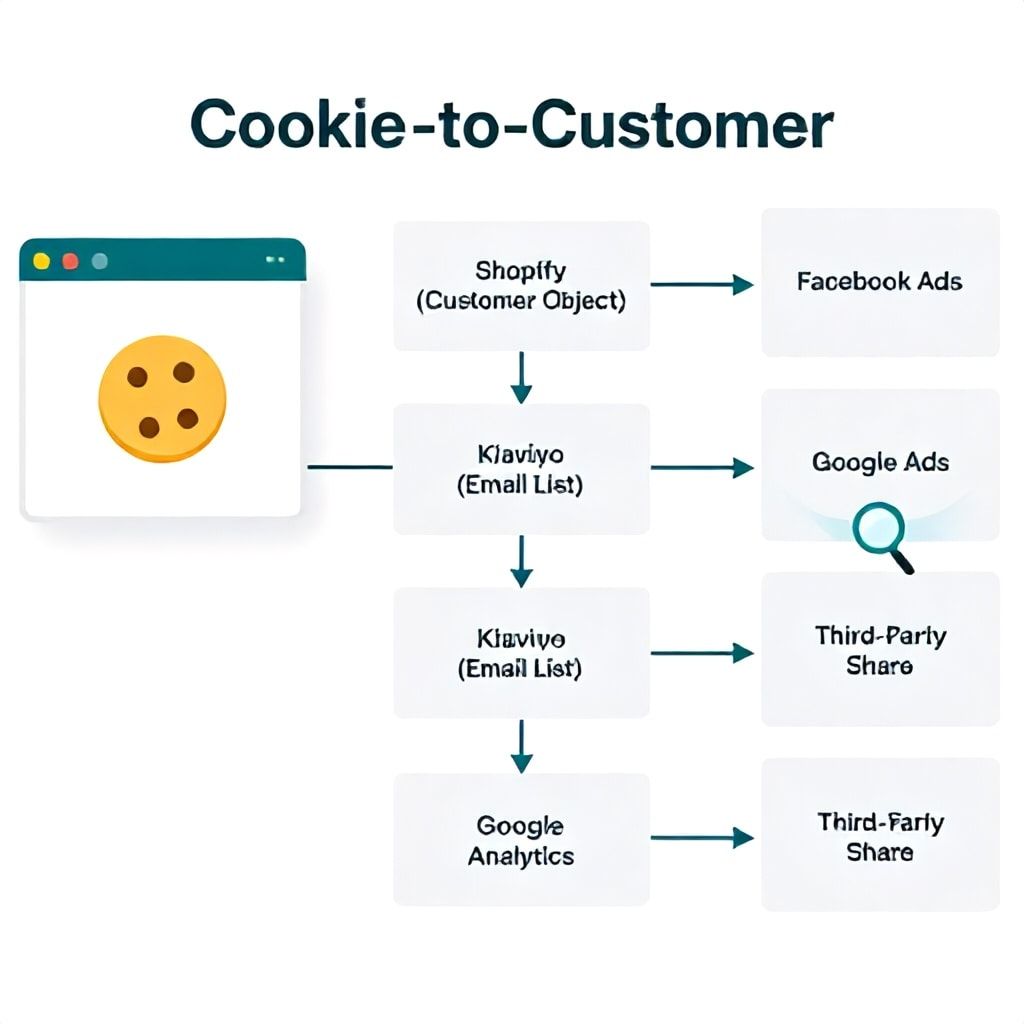
Step 2: Map Your Data Flows (The “Cookie-to-Customer” Journey)
Most guides tell you to “create a data map” but give zero actionable method. Here’s how a practitioner does it. You’re tracking the journey of a data point from collection to deletion.
1. Point of Collection: Identify every spot: checkout page, newsletter signup pop-up, account creation, review submission, contact form, cookie banner.
2. Internal Storage: Where does it land first? (Shopify’s customer object, your ESP’s contact list, a Google Sheets backup from a form).
3. Third-Party Sharing/“Selling”: This is critical for CCPA. Does this data get sent to Facebook for ad targeting? To Google Analytics 4 for measurement? To a CRM like HubSpot? Each of these is a potential “sale” or “share.”
4. Purpose & Retention: For each flow, document why you collect it (legal basis) and how long you keep it. For example, “Order data stored in Shopify for 7 years for tax compliance; email address shared with Klaviyo for marketing until user unsubscribes.”
The goal is to answer this question for any data point: “If a customer asks us to delete their data, do we know every single place we need to delete it from?” If your answer is “I think so,” your map is incomplete.
Step 3: Implement the Core Technical Requirements
This is where most SMBs get stuck. The law requires specific consumer-facing mechanisms. You don’t need a custom dev team; you need the right plugins and configurations.
- “Do Not Sell or Share My Personal Information” Link: This must be clearly visible in your website footer, typically as “Your Privacy Choices” or “Do Not Sell My Personal Information.” It must lead to a tool that allows users to opt-out of data “sales” (e.g., targeted advertising).
- Data Request Submission Method: You must provide at least two ways for consumers to submit “Access,” “Deletion,” and “Correction” requests. This is usually a webform linked from your privacy policy and an email address (e.g., [email protected]).
- Cookie Consent Management: Your cookie banner must do more than just say “OK.” For CCPA, it needs to clearly link to the “Do Not Sell” opt-out and provide a way to manage consent by category (e.g., strictly necessary, performance, advertising).
Platform-Specific Implementation:
For Shopify: Do NOT rely on the basic “cookie banner” in preferences. It’s insufficient. Use a dedicated app like “CCPA/CPRA Compliance Center” or “Cookiebot” (with CCPA mode enabled). These apps automatically add the required footer link, manage cookie consent with opt-out preferences, and often include a pre-built data request form that integrates with Shopify’s customer data. Cost: $10-$40/month.
For WooCommerce: Use a plugin like “CookieYes” or “Complianz.” Configure it for CCPA compliance, which will generate the necessary banner, opt-out shortcode for your footer, and a privacy statement. You’ll need to manually add the data request form, often using a complimentary plugin like “WP GDPR/CCPA Compliance.”
Common Pitfall: Installing a tool and not configuring it correctly. Simply having a banner is not compliance. You must test the opt-out link to confirm it actually blocks data sharing with your advertising tags.
Step 4: Develop Your Internal Request Handling Process
The technical tools collect the requests; your process fulfills them. You have 45 days to respond. A manual process is feasible for small stores receiving a few requests a month.
1. Receipt & Verification: Designate one person (often the owner or ops manager) to monitor the submission email/webform. You must verify the requester’s identity “with a reasonable degree of certainty.” For an access request, this usually means matching the request email to an email in your system. For a sensitive deletion request, you may ask for additional verification, like the last 4 digits of a phone number on file.
2. Data Collection & Report Generation: For an Access request, use your Data Map (Step 2) to pull data from all sources: export the customer CSV from Shopify, screenshot their Klaviyo profile, export their support tickets. Consolidate this into a single, readable report (PDF).
3. Deletion Execution: For a Deletion request, you must delete the data from all systems, including backups, unless an exception applies (like needing to keep order data for tax law). Go down your Data Map and delete manually: anonymize in Shopify, delete from Klaviyo, suppress in Facebook Ads Manager.
4. Documentation: Keep a private log of every request received, the date, the action taken, and proof of completion. This is your audit trail.
Pro-Tip: Create a standard operating procedure (SOP) document with checklists for each request type. This turns a stressful, ad-hoc task into a 15-minute routine.
Step 5: Create & Publish Your Privacy Policy
Your privacy policy is the cornerstone of your compliance. It must be updated to include specific CCPA/CPRA-mandated disclosures. Do not just copy a template from a random website. It must reflect your actual practices from Step 1 & 2.
Essential CCPA Additions for E-commerce:
- A list of the categories of personal information collected in the past 12 months (e.g., “Identifiers,” “Commercial Information”).
- The business or commercial purpose for collecting each category.
- The categories of third parties with whom you share or sell the information (e.g., “Advertising networks,” “Analytics providers”).
- A description of consumers’ rights under CCPA/CPRA (Access, Deletion, Correction, Opt-Out of Sale/Sharing, Limit Use of Sensitive Data) and clear instructions on how to exercise them (e.g., “Click the ‘Your Privacy Choices’ link in our footer” or “Email privacy@...”).
- The date of the last update.
Tool Recommendation: Use a policy generator built for compliance, like Termly or Iubenda. For about $15-$20/month, they provide legally-vetted templates you customize, and they automatically add required clauses and keep them updated for law changes. This is far more reliable than a one-time $99 PDF from a generic legal site.
Step 6: Train Your Team
Compliance fails when only one person knows the process. Your customer service, marketing, and development teams need baseline awareness.
- Customer Service: Train them to identify a CCPA request that comes in via chat or support email. They should have a template response to acknowledge receipt and route it to the designated privacy point person.
- Marketing: They must understand what “opting out of sale” means for ad campaigns. If a user opts out, their data should be suppressed in email and ad platforms to honor the choice.
- Development/Ops: Anyone who adds a new tool (a new pop-up, analytics script, CRM) must know to check if it collects personal information and update the Data Map and Privacy Policy.
A 30-minute quarterly review meeting is enough for a small team to stay aligned.
Step 7: Maintain, Audit, and Iterate
Compliance is not a one-time project. Every time you add a new app, launch a new landing page, or change your ad strategy, you must revisit your data flows.
- Quarterly: Review the apps installed on your store. Remove any unused ones. Check your Data Map against current tools.
- Semi-Annually: Test your own data request channels. Submit an access request to yourself. Is the process smooth? Does the report make sense?
- Annually: Review and update your Privacy Policy. Update your team training. Check the official California Attorney General’s CCPA site for any regulatory updates.
Budget & Tool Implementation: A Tiered Approach
Your compliance budget should scale with your store’s size and request volume. Here’s a realistic breakdown.
| Store Profile | Recommended Approach | Core Tools (Monthly Est. Cost) | Time Investment | Key Risk Mitigated |
|---|---|---|---|---|
| Solopreneur / Micro-Store (<$500k revenue, few requests) |
Manual, DIY-focused. Use platform-specific apps for requirements, manual fulfillment. | Shopify/Woo CCPA App ($15) + Termly/Iubenda ($20). Total: ~$35 |
Initial: 20-25 hrs Ongoing: 1-2 hrs/month |
Consumer complaints, basic regulatory scrutiny. |
| Small Team / Growing Brand ($500k - $5M revenue, steady requests) |
Semi-automated. Invest in tools that streamline request management. | Compliance App ($30) + Policy Generator ($20) + Request Management (e.g., DataGrail, $200+). Total: $250+ |
Initial: 30-40 hrs Ongoing: 3-5 hrs/month |
Missing request deadlines, human error in data deletion. |
| Established Brand / Multiple Channels ($5M+ revenue, many requests) |
Full automation & legal review. Treat privacy as a core business function. | Enterprise CMP (e.g., OneTrust, $500+) + Dedicated Request Platform + Legal counsel retainer. Total: $2000+ |
Dedicated part-time/full-time role. | Class-action lawsuits, major regulatory fines, brand reputation damage. |
The SMB Sweet Spot: For most readers, the first tier is sufficient for 12-24 months. The jump to a dedicated request platform like DataGrail or Transcend becomes worth it when you’re spending more than 5 hours a month manually fulfilling requests, or when you have over 10 data systems to check.
Common CCPA Compliance Mistakes (And How to Avoid Them)
After auditing dozens of small e-commerce setups, these are the recurring, costly errors I see.
- Mistake: Assuming you’re exempt based only on revenue. Why It Fails: You ignore the 100,000-consumer data threshold, which is easy to hit with modern marketing stacks. Fix: Conduct the three-threshold test honestly in Step 1.
- Mistake: Installing a generic “GDPR cookie banner” and calling it CCPA compliant. Why It Fails: GDPR is about “consent”; CCPA is about “the right to opt-out of sale.” A banner that only seeks consent doesn’t fulfill the “Do Not Sell” link requirement. Fix: Use a tool explicitly configured for CCPA/CPRA that provides a persistent opt-out link.
- Mistake: Using a static, non-specific privacy policy. Why It Fails: If your policy doesn’t accurately list the third parties you share with (e.g., TikTok Pixel, Yotpo), you’re misrepresenting your practices, which is a violation. Fix: Use a dynamic generator or update your policy manually every time your tech stack changes.
- Mistake: Not verifying the identity of the person making a data request. Why It Fails: Fulfilling a request from a malicious actor (e.g., an ex-spouse, a competitor) could violate other privacy laws. You’re obligated to verify “with reasonable certainty.” Fix: Have a simple verification step in your internal process (Step 4).
- Mistake: Ignoring “honored” opt-out signals. Why It Fails: The CPRA introduced the Global Privacy Control (GPC), a browser-level signal users can set to automatically opt-out of sale. The law requires you to “honor” it. Fix: Check if your CCPA compliance app or Consent Management Platform (CMP) detects and respects the GPC signal. This is becoming a key enforcement focus.
Frequently Asked Questions
If my store’s revenue is under $25 million, do I need CCPA compliance?
Not necessarily, but don’t assume you’re exempt. You must also check if you handle data for 100,000+ California consumers or derive 50% of revenue from selling/sharing data. Many growing e-commerce stores hit the 100,000-consumer threshold before the $25M revenue mark because of their marketing and analytics tools. It’s safer to do the full three-part test. If you’re below all thresholds today, bookmark this guide and re-evaluate every six months as your business scales.
What is the most important CCPA right for e-commerce stores to prepare for?
The Right to Opt-Out of Sale/Sharing is the most operationally challenging. It requires a clear link on your homepage and a functional mechanism to stop data flows to advertising partners. The Right to Deletion is the most time-consuming to fulfill manually, as it requires you to find and delete data from every system in your stack. Prioritize setting up the technical opt-out first, as it’s a visible compliance failure if missing, then build a robust manual process for handling deletion requests.
Do I need to buy a separate CCPA app for my Shopify store?
In almost all cases, yes. Shopify’s native features do not provide a compliant “Do Not Sell” link or a request management system out of the box. A dedicated app from the Shopify App Store (like “CCPA/CPRA Compliance Center”) is the most cost-effective and integrated solution. It automatically adds the required link, manages cookie consent for CCPA, and often provides a data request form that ties into Shopify’s backend. The $15-$40/month cost is a fraction of the potential fine or legal fee.
Should I set my cookie banner to “opt-in” or “opt-out” for CCPA?
For CCPA, your default should generally be “opt-out” for data “sales” (targeted advertising). This means non-essential cookies for advertising can be set by default, but you must provide a clear and easy way for the user to opt-out immediately. This differs from GDPR’s stricter “opt-in” standard. However, the safest practice for stores with visitors from both California and the EU is to use a smart Consent Management Platform (CMP) that detects the user’s location and serves the appropriate banner (opt-in for EU, opt-out for CA).
How do I handle a “delete my data” request from a web scraping tool?
This is a tricky real-world scenario. If you receive a request via a third-party service like “Deleteme” or “Incogni,” you must treat it as a valid consumer request. The service acts as an authorized agent. You should still perform a reasonable verification step—often, the service will provide proof of the consumer’s authorization. Follow your standard deletion process. Document that the request came via an authorized agent, as this is a recognized practice under CCPA regulations.
Where exactly should I put my “Do Not Sell” link and privacy policy?
The “Do Not Sell or Share My Personal Information” link (or “Your Privacy Choices”) must be prominently displayed. The standard, expected location is in your website footer, alongside links like “Contact Us” and “Terms of Service.” It should be visible on every page. Your Privacy Policy must be linked in two places: 1) In the same website footer, and 2) At every point of data collection. This means adding a link near your checkout, account sign-up, and contact forms with text like “See our Privacy Policy for how we handle your data.”
Your Next Step: Start the Audit Today
The path to CCPA compliance isn’t paved with complex legal theory; it’s built with systematic, practical actions. The single biggest mistake is paralysis—waiting for a “quieter time” or a definitive warning. That warning could be a legal demand that forces you to scramble under a 30-day deadline. Your action today is simple: Block 30 minutes on your calendar this week. Open a spreadsheet and start Step 1. List your top five tools (Shopify, your email platform, Google Analytics, Facebook Pixel, one other). Write down what data they collect. That’s it. You’ve started. From there, follow the 7-step sequence. The investment you make in building a privacy-conscious operation isn’t just about avoiding fines; it’s about building durable trust with your customers in an era where data stewardship is a competitive advantage. For a broader look at the US privacy landscape, including upcoming state laws, see our Master US Data Privacy Compliance Playbook.
Boomlify Team