
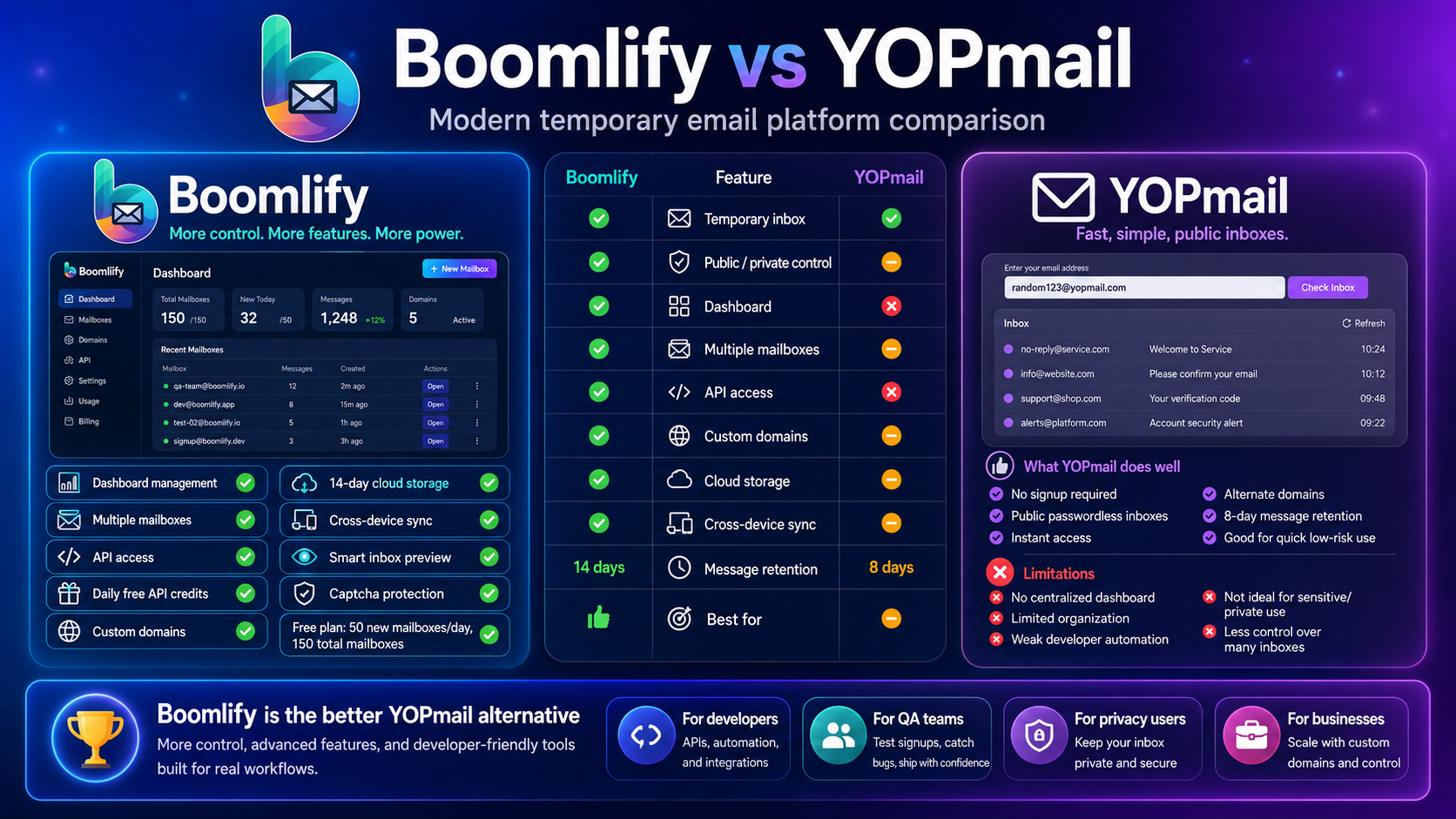
YOPmail Alternative: Why Boomlify Is a More Modern Temporary Email Platform
YOPmail is one of the oldest and most recognizable names in the temporary email space. Many users know it because it is simple, fast, and does not require registration. The basic idea is easy to understand: type any inbox name, use it as a YOPmail address, and check incoming messages without creating an account or setting a password. For quick signups, newsletter forms, forum registrations, download pages, and basic spam protection, YOPmail has been useful for years. It gives users a temporary email address without forcing them to expose their personal inbox.
That simplicity is also why YOPmail is still searched heavily. It removes friction. A user does not need to sign up, confirm a phone number, install an app, or understand a complicated dashboard. Any mailbox name can be checked directly, random addresses can be generated, and messages are kept for a limited time. YOPmail also supports alternate domains, so emails sent to supported alternative domain names are forwarded into the matching YOPmail inbox. This helps users when the main YOPmail domain is blocked by certain websites.
However, temporary email usage has changed. Today, many users need more than a public, passwordless inbox. Developers need API access for testing signup flows. QA teams need many inboxes for repeated verification tests. Privacy-focused users want separate addresses that can be managed from one account. Power users want longer retention, custom domains, cloud sync, organized inbox previews, and better control over mailbox limits. This is where Boomlify becomes a strong YOPmail alternative. Boomlify keeps the convenience of temporary email, but adds the structure of a modern SaaS platform.
What YOPmail Does Well
YOPmail’s biggest strength is instant access. Users can choose a mailbox name and immediately receive messages at that address. There is no registration process, which makes the service useful for fast, low-risk tasks. If a website asks for an email address just to unlock a download, read a page, claim a trial, or receive a one-time verification code, YOPmail can be a practical option. Its random email generator also helps users create anonymous addresses when they do not want to invent a username manually.
Another useful YOPmail feature is its alternate domain system. Disposable email domains are often blocked by websites, so YOPmail offers alternative domains that forward messages to the main YOPmail inbox. The user only changes the domain part of the email address, while the inbox name remains the same. This makes YOPmail more flexible than a basic one-domain temporary email site. YOPmail also allows users to add their own domain by configuring MX records, which can be helpful for people who want a personal disposable email setup connected to YOPmail’s receiving system.
YOPmail also has a clear public-inbox model. There are no passwords, and inboxes are not private in the traditional sense. This can be convenient because there is nothing to remember except the inbox name. It can also be risky if a user chooses a predictable address or uses the inbox for anything sensitive. Anyone who knows the inbox name may be able to view messages. For simple spam protection, that trade-off may be acceptable. For private accounts, business communication, financial services, password resets, or anything confidential, it is not the right model.
Where YOPmail Can Feel Limited
YOPmail is effective when the task is simple, but it can feel limited when temporary email becomes part of a real workflow. The platform is mainly built around public inbox access, not account-based mailbox management. If a user creates many temporary addresses, there is no advanced dashboard where those inboxes can be organized, labeled, previewed, synced, or managed as part of one workspace. Users must remember which inbox name they used for each website, and they need to revisit those inboxes manually.
Retention is another limitation. YOPmail says messages are kept for 8 days. That is better than extremely short 10-minute inboxes, but it may not be enough for users who need to revisit messages after two weeks, one month, or longer. Many testing and privacy workflows require more predictable storage. For example, a developer may need to check old verification messages while debugging an onboarding issue. A user may need to recover a confirmation link from a service they tested several days earlier. A QA team may need test inbox history for repeated product checks. YOPmail’s short public-inbox model is not ideal for those cases.
YOPmail also does not provide the same type of structured API and credit model that Boomlify offers. While YOPmail is useful for manual inbox checking, Boomlify is built with developers and automation in mind. Modern teams often need to generate temporary mailboxes, fetch messages, list inboxes, check mailbox status, and clean up test data programmatically. A temporary email tool becomes much more powerful when it can be integrated into signup tests, QA pipelines, app verification flows, and internal automation systems.
Why Boomlify Is a Strong YOPmail Alternative
Boomlify is designed for users who want temporary email with more control. Instead of relying only on public inbox names, Boomlify provides an account-based dashboard where users can create and manage many temporary mailboxes from one place. This makes it easier to separate personal testing, signup forms, client accounts, product trials, and development workflows. A centralized dashboard is especially useful for people who use disposable email every day instead of only once in a while.
The free Boomlify plan is one of its biggest advantages. Free users can create up to 50 new mailboxes per day and keep up to 150 total mailboxes. They get captcha protection, an ads-supported experience, 14-day cloud message storage, a smart inbox preview, cross-device sync, a centralized dashboard, and a 60-day email validity window. This gives free users a real working environment, not just a single throwaway inbox. For casual users, the free plan is enough to protect a primary email address from spam. For light technical users, it is enough to test common verification workflows without paying immediately.
Boomlify also gives every account API access. Free users receive an API key, 60 requests per minute, and daily free credits. Mailbox creation uses credits, but reading and fetching emails, listing mailboxes, deleting or renaming mailboxes, checking mailbox status, and managing API keys are described as free actions. This is important because most automation workflows need repeated reading and checking after a mailbox has already been created. Boomlify’s model keeps those common actions simple and predictable.
Custom Domains and Better Inbox Ownership
YOPmail does allow users to add a domain by pointing MX records to its receiving server, and that is a useful feature for some advanced users. Boomlify approaches custom domains through a broader product structure. Even the free plan includes custom domain control with defined limits, while paid plans increase the number of domains, daily custom-domain mailbox creation, and custom-domain mailbox capacity. This makes Boomlify more suitable for users who want branded temporary email as part of a stable workspace.
Custom domains are especially useful for developers, startups, agencies, and teams. Public disposable domains are often blocked by websites, and they can look less professional during testing. A custom domain allows users to create temporary addresses under a domain they control. That can improve deliverability during tests, make workflows easier to track, and separate private testing from public disposable inbox traffic. Boomlify’s custom domain support gives users more control over the identity and structure of their temporary addresses.
Better for Developers and QA Testing
For developers and QA testers, Boomlify is a stronger fit than YOPmail. YOPmail works well for manual checks, but Boomlify is better when temporary email needs to be part of repeatable testing. A QA workflow may require hundreds of test addresses, signup confirmations, password reset links, invite emails, onboarding messages, and transactional email checks. Doing that manually with public inbox names can become messy. Boomlify’s dashboard and API make the workflow easier to manage.
Paid Boomlify plans increase mailbox limits, storage windows, API rate limits, premium domain access, Telegram forwarding, and credit bonuses. This gives users a clear upgrade path. A small user can start free, a growing tester can move to Basic or Pro, and a power user or team can move to higher plans when they need more throughput. YOPmail is excellent for simplicity, but Boomlify is better when scale, automation, and management matter.
Privacy and Security Differences
Both YOPmail and Boomlify help protect a user’s real email address from spam. The difference is how much control the user receives. YOPmail’s public, passwordless inbox model is simple, but it should only be used for low-risk activities. A predictable YOPmail address can be opened by someone else if they know the inbox name. That makes it unsuitable for sensitive communication, private account recovery, banking, government services, business records, or anything that should remain confidential.
Boomlify is also a temporary email service, so it should still be used responsibly. However, its account-based dashboard, cloud sync, mailbox limits, retention controls, password generator, local password vault, 2FA manager, and privacy-focused tools make it more practical for organized usage. Users can separate disposable inboxes by purpose and manage them from one place instead of relying only on public mailbox names. This gives Boomlify a more modern privacy workflow for everyday users and technical teams.
YOPmail vs Boomlify: Which One Should You Choose?
Choose YOPmail if you want the fastest possible temporary inbox with no signup and no account. It is a good option for simple, low-risk tasks where you only need to receive a message quickly and do not care about long-term organization. It is also useful if you like the idea of choosing any inbox name and checking it instantly.
Choose Boomlify if you want a more complete temporary email platform. Boomlify is better for users who need multiple mailboxes, longer control, dashboard management, API access, daily free credits, custom domains, cloud storage, smart previews, cross-device sync, and scalable paid plans. Its free plan is especially strong because it gives users generous limits while still keeping the platform accessible. You can create many mailboxes per day, manage them in one dashboard, use API access, and store messages longer than many basic disposable inbox tools.
Final Verdict
YOPmail remains a classic temporary email service because it is fast, free, and easy to use. Its no-registration model, random address generator, alternate domains, and 8-day message retention make it useful for quick spam protection and simple signups. But YOPmail is best for temporary, low-risk, manual use.
Boomlify is the better YOPmail alternative for users who want a modern disposable email workspace. It combines temporary email with dashboard management, free mailbox limits, API access, custom domains, cloud storage, security tools, and scalable plans. For normal users, Boomlify helps protect a personal inbox from spam. For developers, it supports automated verification flows. For QA teams, it makes repeated email testing easier. For power users, it adds custom-domain control and longer retention options. If YOPmail is a classic public temporary inbox, Boomlify is a more complete temporary email SaaS platform built for today’s privacy, testing, and automation needs.