
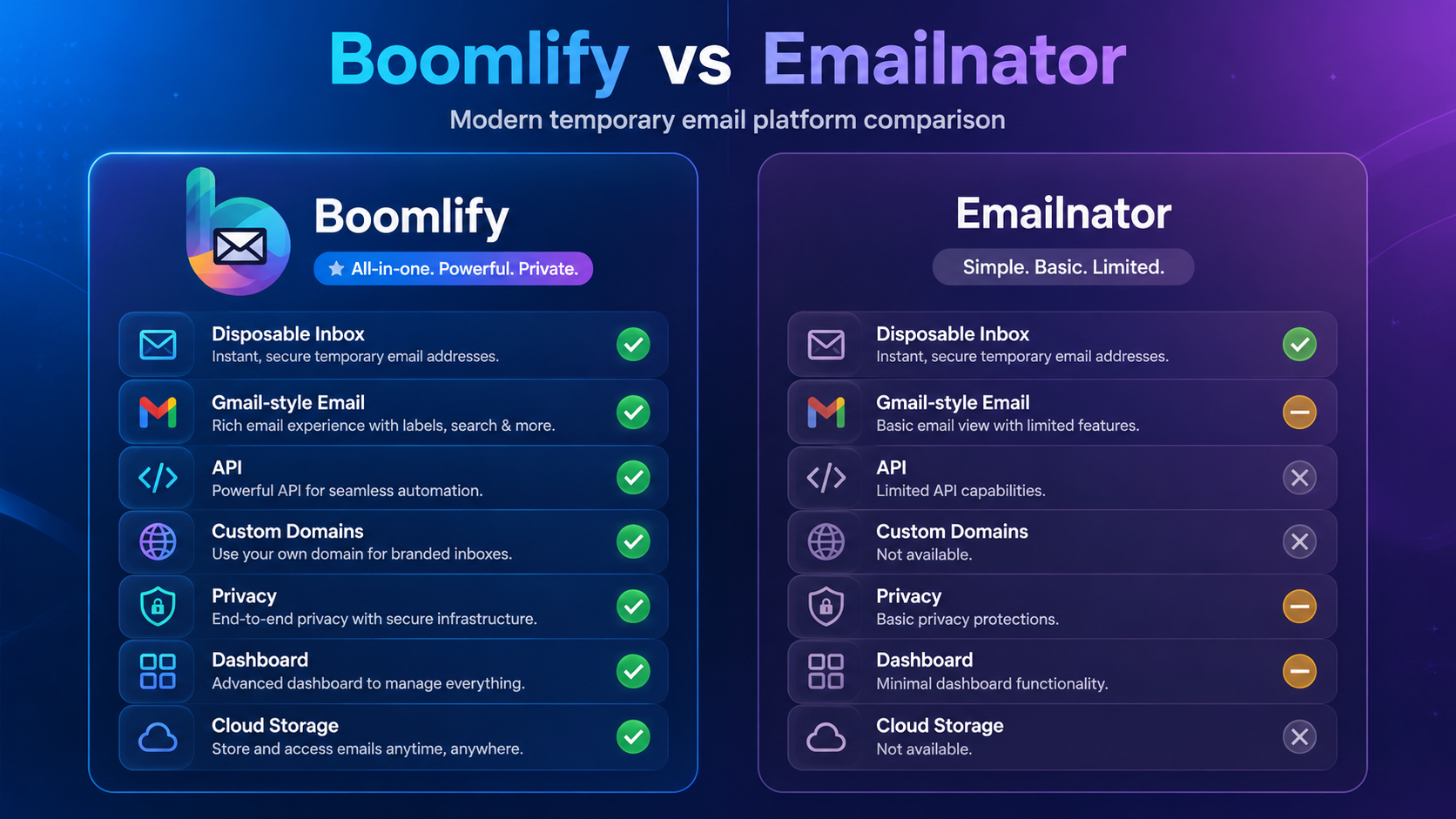
Emailnator Alternative: Why Boomlify Is a More Complete Temporary Email Platform
Emailnator is one of the better-known disposable email services for users who want a quick temporary inbox without exposing their personal address. It is especially recognizable because it focuses on temporary Gmail-style addresses and simple mailbox access. For a user who only needs a fast inbox for a signup, verification code, download page, newsletter test, or one-time account check, Emailnator can be useful because the workflow is direct: generate an address, copy it, wait for the message, and open the inbox. That simplicity is the reason many people search for Emailnator when they need a temporary email address that looks familiar and works quickly.
However, temporary email has changed. Many users no longer need only a one-tab disposable inbox. They need reusable temporary mailboxes, longer message retention, organized inbox management, custom domain support, automation-friendly APIs, and security tools that help them manage verification workflows safely. This is where Boomlify becomes a strong Emailnator alternative. Boomlify is designed for users who want the speed of disposable email but also need a modern dashboard, flexible mailbox lifetimes, API access, cloud storage, custom domains, and account-based management. Instead of treating every temporary address as a short, throwaway session, Boomlify gives users more control over how many mailboxes they create, how long those mailboxes remain useful, and how they manage incoming messages across devices.
What Emailnator Does Well
Emailnator’s main strength is its narrow focus. It gives users a temporary email experience centered on Gmail-style addresses and quick inbox access. Its public pages describe features such as generated Gmail addresses, custom email options, bulk email generation, mailbox viewing, and an API that can generate emails, generate bulk emails, list inbox messages, view messages, delete messages, and send messages. Emailnator also offers premium access with benefits such as no ads, premium inboxes, more premium emails, history emails, saved email addresses, and priority support. For casual users, these features can be enough when the goal is only to receive a verification email or reduce spam on a personal inbox.
Emailnator is also familiar to users who prefer a service that does not require much explanation. The interface is based around generating an email and checking the mailbox. This makes it convenient for quick testing, short-term browsing, and simple account confirmation. Its FAQ also explains that generated addresses are part of the system and may be distributed for public use, which is important for users to understand before using any temporary inbox for sensitive activity. Like most disposable email services, Emailnator is not meant for banking, private accounts, confidential communication, or anything that should remain permanently secure.
Where Emailnator Can Feel Limited
The same simplicity that makes Emailnator attractive can also make it limiting. A basic temporary inbox is useful for one-time use, but it may not be enough for users who manage many signups, test multiple products, work with QA automation, or need disposable addresses that stay organized for more than a single session. Public disposable inboxes can also create confusion because the user must remember which address was used where, and whether the mailbox will still be available later. When temporary email becomes part of a real workflow, users often need more than a randomly generated address and a mailbox page.
Emailnator’s own FAQ says messages are stored in the mailbox for only 24 hours, with a seven-day backup of messages available by contacting support. That can be acceptable for quick signups, but it is not ideal for users who need to revisit verification emails, track test accounts, or maintain temporary identities for several days or weeks. Emailnator’s premium page mentions history emails and saved email addresses, but the platform is still mainly known as a disposable Gmail-style inbox generator rather than a full temporary email workspace. Users who want predictable retention, mailbox limits, team-style organization, API throughput, and custom domain control may need a more structured option.
Why Boomlify Is a Strong Emailnator Alternative
Boomlify is built around a broader temporary email model. It gives users disposable inboxes, but it also adds a centralized dashboard where many mailboxes can be created, previewed, managed, renamed, deleted, and reused depending on the selected lifespan. This matters because temporary email is often used repeatedly. A privacy-focused user may create different addresses for different websites. A developer may need test inboxes for signup flows. A QA tester may need to confirm password resets, onboarding emails, invite links, and transactional notifications. A business may need branded temporary addresses under its own domain. Boomlify is designed for these layered use cases instead of only one-time inbox access.
The free plan is one of Boomlify’s strongest advantages. Free users can create up to 50 new mailboxes per day, keep up to 150 total mailboxes, use a centralized dashboard, preview inbox activity, sync across devices, and receive 14-day cloud message storage with a 60-day email validity window. Free accounts also receive API access with 60 requests per minute and daily free credits. That means Boomlify can be useful not only for casual users, but also for small developers, testers, and privacy-focused users who want to try automation without immediately paying for a subscription. Many temporary email tools keep advanced workflow features behind paid plans; Boomlify gives a practical amount of functionality to free users while still keeping reasonable limits.
Boomlify also supports a credit-based API system. Only mailbox creation costs credits, while reading emails, fetching emails, listing mailboxes, deleting or renaming mailboxes, checking mailbox status, and managing API keys are described as free API actions. This model is useful for developers because it keeps the most common read and management operations predictable. A developer can create a temporary mailbox for a test, receive the message, fetch the inbox, confirm the result, and clean up the mailbox without paying for every small action. For teams that run repeated tests, the separation between subscription features and API credits makes the platform easier to scale.
Better for Developers, QA, and Automation
Emailnator does provide an API through RapidAPI, and that is a useful feature for developers who want programmatic access to generated addresses and inbox actions. Boomlify, however, positions API access as a central part of the product rather than an extra utility. Every Boomlify account receives an API key, a defined rate limit, and daily free credits. Paid plans increase rate limits and add credit bonuses, while the highest tier removes API limits entirely. This gives developers a clearer upgrade path as testing volume grows.
For QA teams, this difference is important. A test suite may need to create accounts, receive activation links, test invite emails, verify password reset messages, and confirm transactional emails across multiple environments. A basic disposable inbox can work for a manual test, but a dashboard plus API access is better for repeatable workflows. Boomlify’s mailbox limits, retention windows, and centralized management make it easier to keep test addresses organized instead of losing track of which temporary inbox belongs to which test case.
Custom Domains and Branded Temporary Email
Another major difference is custom domain control. Boomlify offers custom domain support even on the free plan, with paid plans increasing the number of domains, custom-domain mailbox capacity, and daily custom-domain mailbox creation limits. This is valuable for users who want disposable addresses that match their own brand, internal testing domain, side project, or company workflow. A custom domain also helps teams separate test mail from public disposable domains that may already be blocked by some websites.
Emailnator’s premium page mentions private domain features as coming soon, but Boomlify presents custom domains as part of its active plan structure. That makes Boomlify more useful for advanced users who want branded temporary email today rather than only generic disposable addresses. For developers and businesses, custom domains can make verification testing cleaner, easier to audit, and more realistic.
Privacy, Security, and Everyday Use
Temporary email is mainly used to reduce spam and protect a primary inbox. Boomlify extends that privacy use case with related tools such as a password generator, local password vault, 2FA manager, anonymous inbox features, spam protection, and a Chrome extension for faster access. These tools make sense because disposable email is often used together with account creation, password generation, and verification codes. Keeping these tasks in one workspace can reduce friction for users who frequently sign up for tools, test software, or protect their real address from unnecessary exposure.
At the same time, users should treat all disposable email services responsibly. Temporary inboxes should not be used for banking, government accounts, confidential business accounts, health records, private documents, or any account where long-term ownership matters. Emailnator itself warns users not to use temporary Gmail addresses for accounts containing personal information such as bank accounts, home addresses, confidential transactions, or sensitive privacy data. Boomlify should be used with the same practical judgment: it is excellent for spam reduction, testing, short-term signups, and privacy separation, but it should not replace a permanent secure mailbox for critical accounts.
Emailnator vs Boomlify: Which One Should You Choose?
Choose Emailnator if you want a simple temporary Gmail-style address and only need a quick inbox for short-term use. It is suitable when speed matters more than organization, retention, custom domains, or account-based mailbox management. It is also a familiar option for users who specifically search for Gmail-style disposable addresses.
Choose Boomlify if you want more control. Boomlify is a stronger fit if you need many temporary mailboxes, a dashboard, longer retention, reusable inboxes, custom domains, API access, daily free credits, cross-device sync, and developer-friendly workflows. Boomlify’s free plan is especially attractive because it gives real limits that can support normal users and light technical workflows without forcing an upgrade immediately. Paid plans then add higher capacity, better retention, premium domains, Telegram forwarding, higher API throughput, and larger credit bonuses.
Final Verdict
Emailnator remains a recognizable disposable email service, especially for users who want Gmail-style temporary addresses. It is fast, simple, and useful for one-off inbox needs. But Boomlify is the better Emailnator alternative for users who want a modern temporary email platform rather than only a generator. With a centralized dashboard, generous free plan, flexible mailbox creation, API access, custom domains, cloud storage, security tools, and paid scaling options, Boomlify gives users a more complete way to manage disposable email.
For casual users, Boomlify helps reduce spam and keep a primary inbox private. For developers, it provides API-driven mailbox creation and inbox handling. For QA teams, it supports repeatable verification workflows. For power users, it adds custom domains, higher limits, longer storage, and automation-friendly features. That combination makes Boomlify a practical and future-ready alternative to Emailnator for anyone who has outgrown basic temporary inbox tools.